

How to Remove Shutterstock Watermark from Image - Full Guide
Looking for a Shutterstock remover to remove Shutterstock watermark effortlessly? Read this blog to learn how to get rid of the Shutterstock watermark with two solutions.

By Jonna Updated on May 11, 2026


Can You Remove Shutterstock Watermark?
Shutterstock is a leading global creative platform and stock media marketplace, which allows you to find almost any type of image there. The problem, however, is that images downloaded for free from Shutterstock all have a Shutterstock watermark for licensed content protection.
In such a case, you may probably wonder: Is it even possible to remove Shutterstock watermark? Technically speaking, yes! Shutterstock watermarks are deliberately designed to be difficult to remove. They often span across the entire image, use semi-transparent overlays, and intersect with key visual elements. Here are a few factors that influence success:
- Image complexity: Simple backgrounds are easier to reconstruct.
- Watermark coverage: Larger, repeated marks are harder to eliminate.
- Image resolution: Images with high resolution are easier to detect and erase watermarks.
- Tool used: Manual tools vs AI automation make a big difference.
In the following, we will cover how to remove watermark from image without affecting background using Photoshop and another free app to remove Shutterstock watermark online.

Part 1. How to Remove Shutterstock Watermark in Photoshop
For those who prefer precision and control for removing watermark from Shutterstock, Photoshop remains one of the most powerful tools available. It doesn't offer a one-click solution, but it gives you everything needed to manually reconstruct an image.
This tool offers a suite of native tools and AI-powered plugins to remove watermarks, text, logos, and unwanted objects. Below are some of them that can help you remove watermark from stock photos legally:
|
Tool |
Function |
Best For |
Difficulty |
Speed |
|
Content-Aware Fill |
Automatically fills selected areas using surrounding data. |
Ideal for watermarks on simple to moderately complex backgrounds (e.g., solid colors, gradients, skies). |
Easy |
Fast |
|
Spot Healing Brush |
Sample surrounding pixels and blend them with the target area. |
Perfect for small watermarks (text, small logos) on smooth/solid backgrounds (e.g., white walls, skin, product shots). |
Very Easy |
Fast |
|
Healing Brush |
Blends textures and colors seamlessly. |
Great for medium-sized watermarks on textured backgrounds (e.g., landscapes, fabric, wood). |
Medium |
Medium |
|
Clone Stamp Tool |
Copies pixels from one area to another. |
Best for detailed/complex textures (e.g., grass, brick walls, crowded scenes). |
Hard |
Slow |
|
WatermarkRemover.io Plugin |
Photoshop-compatible AI plugins |
Best for processing bulk or semi-transparent watermarks.
|
Easy |
Fast |
Below are the steps on how to remove Shutterstock watermark using Photoshop's Healing Brush Tool:
Step 1. Click on File > Open to add your Shutterstock image to Photoshop. (Create a duplicate layer if needed)
Step 2. Select the Shutterstock watermark you want to erase using the Lasso or Marquee selection tools.
Step 3. Then, click Edit > Content-Aware Fill. Then, adjust the sampling area in the Content-Aware Fill workspace to control which pixels are used for the fill.
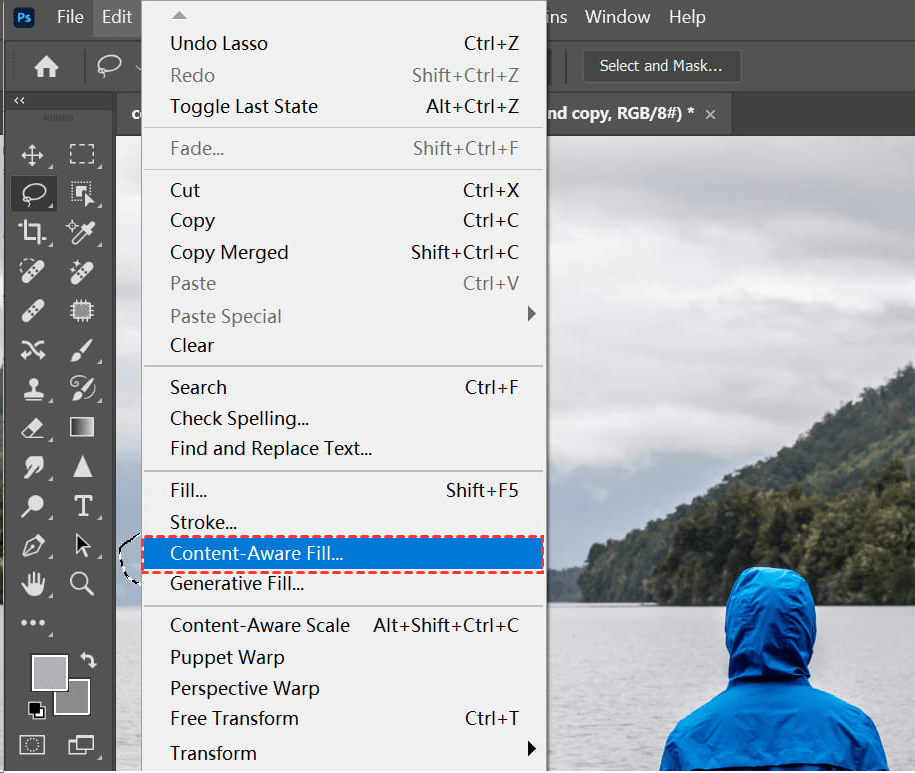
Step 4. When satisfied with the setting, click OK to apply the Content-Aware Fill to delete Shutterstock watermark.
Part 2. Remove Shutterstock Watermark Free with Online Shutterstock Remover
Want an easier watermark remover for Shutterstock, with no need for manual editing? You can try the reliable AI-powered image editing tool - UltraPic. Instead of manually reconstructing pixels, this free online AI watermark remover for high resolution images analyzes the image and automatically fills in the missing areas. Some of its main features are:

Remove Watermarks with AI in Seconds
Get clean, transparent photos instantly with AI.
- Remove watermark from image in 1-click effortlessly
- AI reconstruction fill watermark areas intelligently
- Preserve every detail, keep edges sharp and clean
- No design or editing skills needed, instant result


✅ AI-powered Watermark Detection and Removal: One-click removal of text, logos, stamps, and semi-transparent watermarks.
✅ Object Remover: Erase unwanted elements (people, wires, shadows, distractions) from image easily.
✅ AI Background Editing: Auto-detects subjects (people, products, animals) with edge refinement, exporting your image with a transparent backdrop or generating a new background as needed.
✅ AI Photo Retouching: Smooth skin, remove blemishes, fix red-eye, reduce grain/noise from low-light shots, and so on.
✅ Format & Compatibility: Supports all major formats like JPG, PNG, JPEG, BMP, WebP, and requires no software to install.
Step 1. Visit the UltraPic website, and select the Remove Watermark tool.

Step 2. It selects Auto Removal mode by default. Upload your Shutterstock image, and click HD Removal or Standard Removal.
👉Tip: You can also switch to Manual Removal mode to highlight the watermark area manually for more detailed control of text erasure.

Step 3. Let the AI process the image, and then click Download to export your photo without watermarks easily.
FAQs on Removing Shutterstock Watermark
#1. Can you remove a watermark from a saved Shutterstock image?
Yes, it is technically possible to remove Shutterstock watermark from a saved image using editing tools or AI-based platforms.
However, the quality of the result depends on the image complexity and the method used. Simple backgrounds yield better outcomes, while detailed images require more effort and may still show imperfections.
#2. Is it illegal to remove a Shutterstock watermark?
Watermarks are placed to protect copyrighted material. Removing them without proper licensing can violate terms of use and copyright laws. It’s always recommended to purchase or license images for official or commercial use.
#3. How to get rid of Shutterstock watermark from video?
Removing watermarks from video is more complex than images. You'll need video editing software or AI-based tools that support motion tracking. The process is similar but involves frame-by-frame reconstruction.
#4. How to save Shutterstock images without watermark?
The most reliable way is to download the image through proper licensing. This ensures you get a clean, high-resolution image without any watermark.
#5. Why can't Shutterstock watermark be removed?
Sometimes, even advanced tools struggle to fully remove watermarks. Here’s why:
- Watermarks often cover key image details
- They are repeated across the image
- Background reconstruction can be complex
- AI tools may not perfectly replicate textures
In the End
Removing Shutterstock watermarks is technically feasible but often challenging. Whether you choose Photoshop with more precision or use AI tools with more convenience like UltraPic, each method comes with its own pros and cons.
If you're not a professional image editor, the UltraPic AI editor might be a better option. It offers 1-click watermark removal as well as manual processing. What's more, there are more picture editing capabilities, like object removal, AI generative fill, and so forth.

