

High-End Photo Retouching - Best Tool & How-to Guide
High-end photo retouching is professional image refinement that perfects visuals while retaining authentic detail and texture. This article covers the best tool and provides a complete guide.

By Jonna Updated on March 6, 2026


What is Photo Retouching?
Photo retouching refers to the detailed refinement of an image to enhance its visual quality while preserving realism. It goes beyond simple edits like cropping or exposure correction. Instead, it involves precision adjustments - removing imperfections, improving textures, correcting color inconsistencies, and enhancing depth.
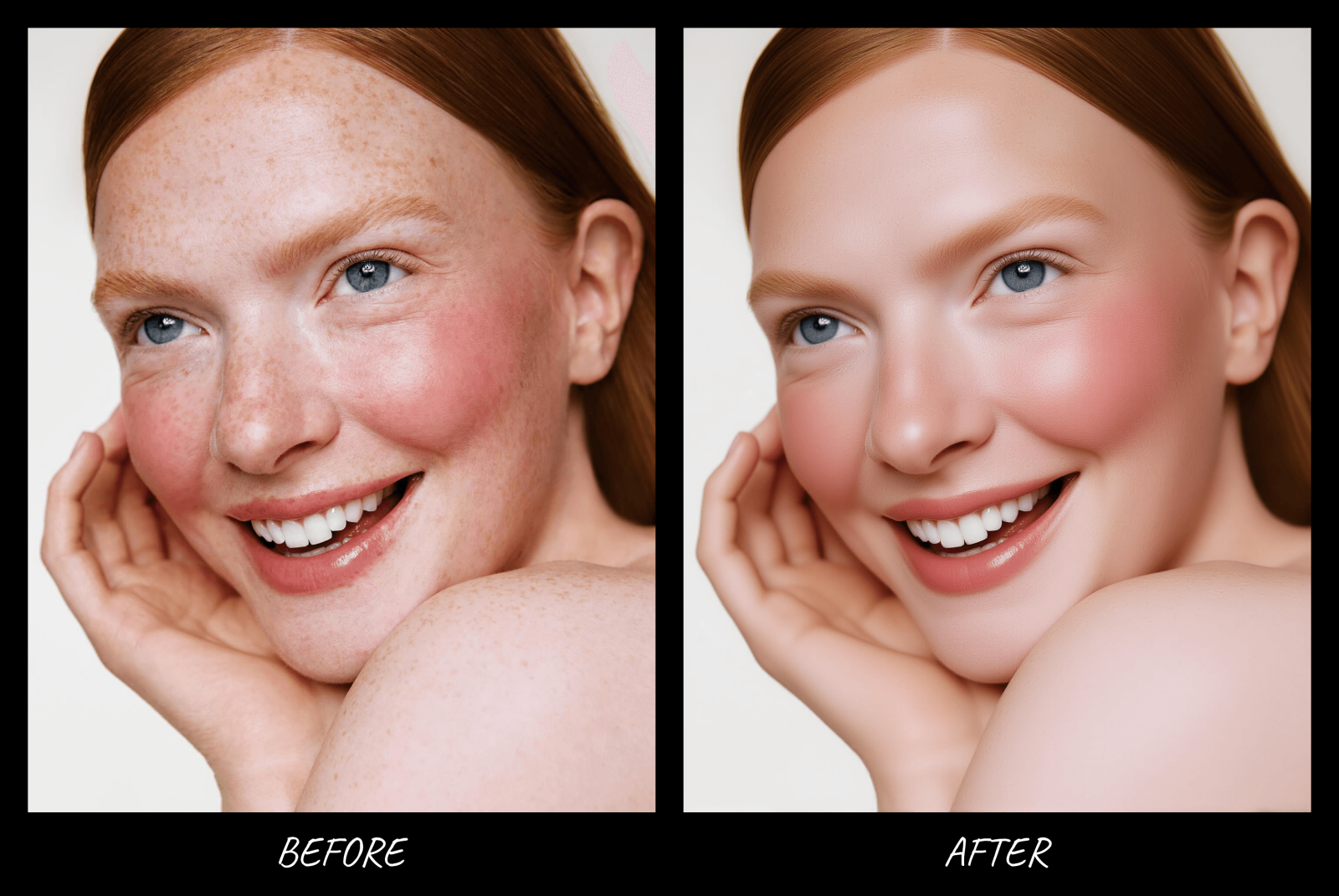
High-end photo retouching goes even further. It maintains natural texture while achieving flawless results. It avoids plastic skin. It avoids over-sharpened surfaces. It elevates an image without making it look digitally manipulated. Image retouching varies depending on the subject. Here we list the most common differences across portrait pictures, product pictures, and landscape pictures.
Portrait Retouching
Portrait retouching focuses on enhancing facial features, skin texture, hair, and overall lighting while preserving the subject’s identity. To be more specific, it is recommended to preserve natural skin texture, dodge (lighten) and burn (darken) sculpt facial structure, enhance eyes without overdoing it, and correct color cast to make your skin tones look natural.
Product Retouching
Product retouching focuses on enhancing commercial photography. Luxury brands depend heavily on visual perfection, especially in beauty, fashion, jewelry, and electronics industries. You can remove micro imperfections, perfect reflections, enhance texture & detail, and maintain true-to-life colors.
Landscape Retouching
Landscape retouching aims to enhance natural scenes without compromising realism. Unlike portrait or product work, landscapes often require balancing wide tonal ranges. You can improve dynamic range, enhance sky naturally, remove distracting elements, and refine color grading.
Best AI High-End Photo Retouching Tool in 2026
UltraPic is a powerful, browser-based online photo editing tool tailored for photography enhancement. Built to simplify professional-level image retouching with intuitive operations - no software installation or advanced editing skills required.
It is specially optimized for e-commerce sellers, photographers, marketers, and content creators, with two professional retouching modes and a full suite of practical editing features to turn ordinary product photos into polished, studio-grade visuals efficiently.
- AI Retouching Mode: Exclusively for amateur-shot product photos. It enables one-click automated retouching with features like automatic background removal, professional lighting reconstruction, intelligent product imperfection removal (dust, smudges, minor scratches), and overall image quality enhancement.
- Studio Retouching Mode: Designed for high-quality professionally shot images with minor imperfections and proper lighting. Adhering to the principle of removing low-frequency imperfections while preserving high-frequency details.

Create Studio-Quality Product Photos with AI
Make product images clean, professional and conversion-ready.
- Remove messy backgrounds in one click effortlessly
- Precision-controlled detail retouching with studio retouching
- Boost clicks and sales with better product images
- No design or editing skills needed, instant result


Also, it comes with various other powerful features like one-click AI background removal, batch photo editing, background customization, watermark removal, magic easing unwanted objects from an image, and so on.
How to Do High-End Photo Retouching Like a Pro using UltraPic
Now, let’s get down to how to do high-end retouching for photos with UltraPic.
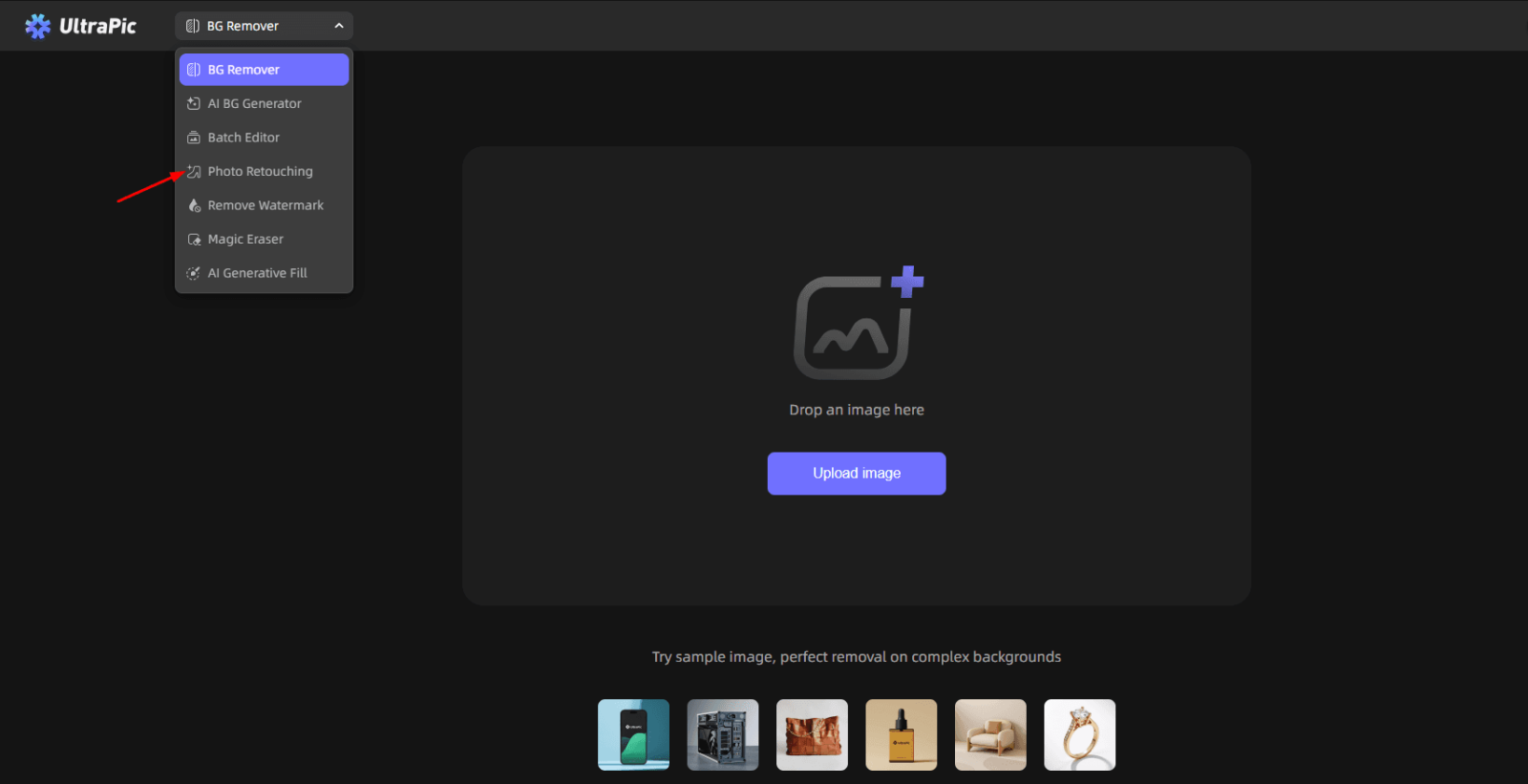
Step 1. Navigate to UltraPic, expand its tool on the top, and select Photo Retouching. Then, upload your image.
Step 2. Choose AI Retouching mode or Studio Retouching mode as needed.
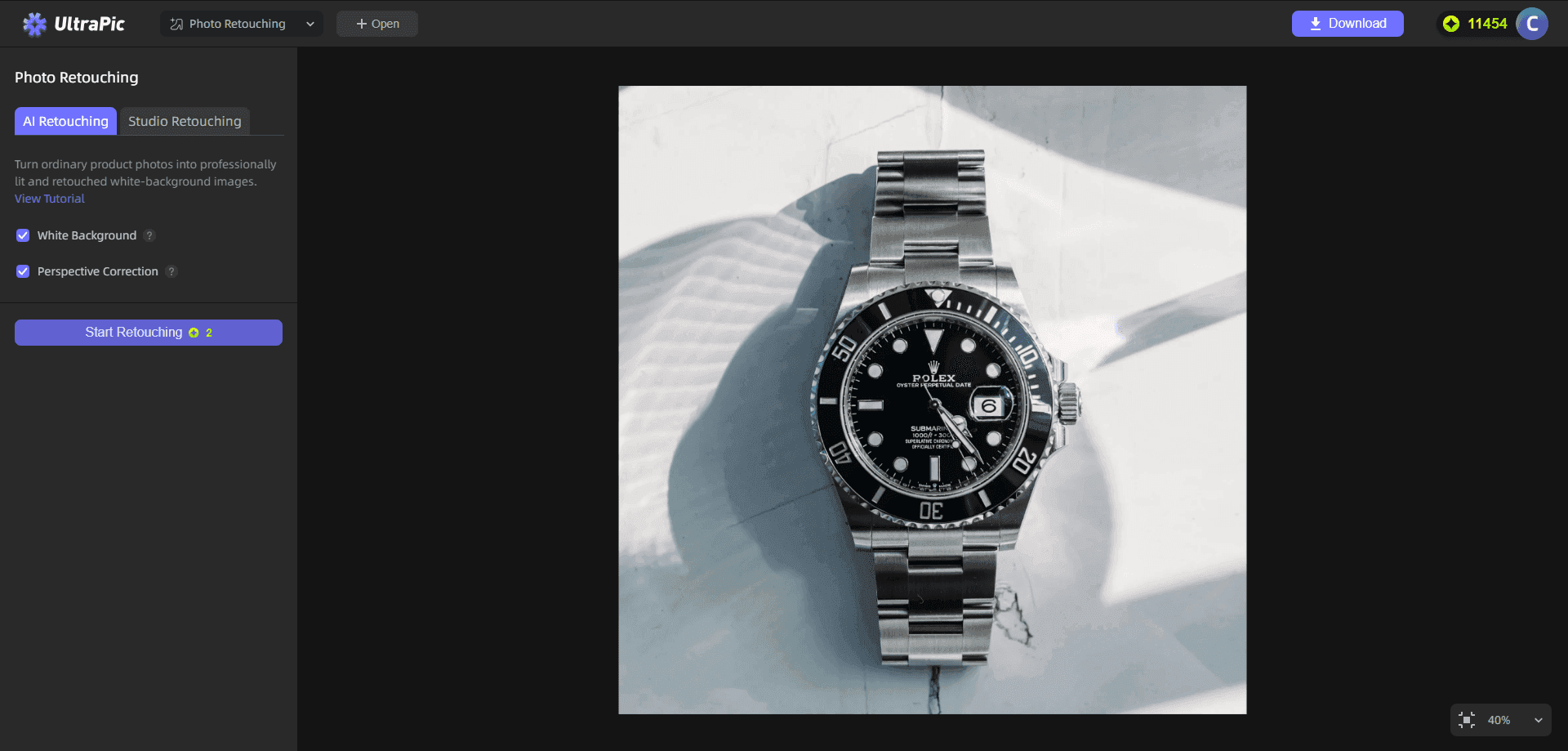
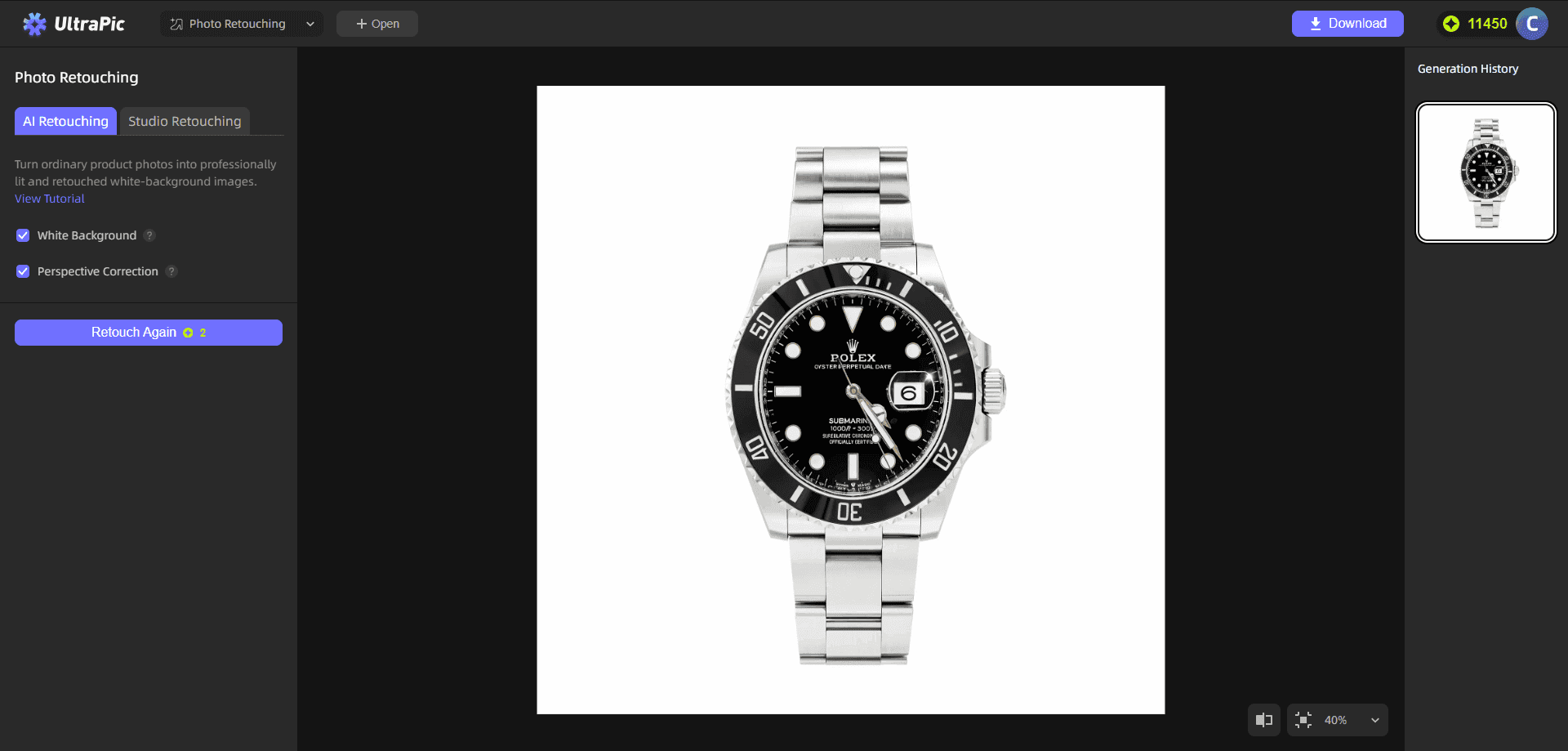
Step 3. Then, click Start Retouching to run it. You can adjust the corresponding settings and click Retouch Again to re-generate a result if you are not satisfied.
Difference Between Photo Editing and Retouching
Beyond photo retouching, photo editing is likely the more common form of image processing. In fact, although both involve secondary processing of images, there are clear distinctions between them. To summarize clearly:
|
Photo Editing |
Photo Retouching |
|
Cropping |
Blemish removal |
|
Basic color correction/White balance adjustment |
Texture refinement/Cleaning reflections/Correcting minor distortions |
|
Exposure adjustment |
Dodge & burn sculpting |
|
Filters |
Precision masking |
|
Global changes |
Pixel-level corrections/Enhancing micro-contrast in specific areas |
FAQs on Photo Retouching
#1. Can AI retouching remove blemishes?
Yes, modern AI retouching tools can automatically detect and remove blemishes with impressive accuracy. They analyze texture patterns and fill imperfections seamlessly.
However, professional high-end photo retouching often requires manual refinement afterward to ensure skin remains natural and textured.
#2. What skills do you need to be a photo retoucher?
To excel in high-end photo retouching, you need:
- Strong understanding of lighting and color theory
- Attention to detail
- Knowledge of advanced masking techniques
- Mastery of dodge and burn methods
- Patience and precision
- Understanding of skin texture preservation
- Familiarity with AI-assisted workflows
#3. How long does it take to retouch a photo?
The time required varies based on complexity. Basic retouching may take 1-5 minutes. High-end commercial or editorial retouching can take tens of minutes or even more than one hour per image.
Efficiency improves with experience and AI assistance, but premium-quality work still demands careful attention.
#4. Can AI retouching fix blurry photos?
AI tools can enhance sharpness and reduce minor blur. However, severely out-of-focus images cannot be fully restored.
High-end photo retouching enhances detail but cannot recreate information that was never captured by the camera.
#5. Can old photos be retouched?
Yes, old photos can definitely be retouched, restored, and enhanced using digital technology. For example, you can fix old photos with AI using Adobe Photoshop, VanceAI Photo Restorer, and other tools.
In the End
High-end photo retouching isn't about heavy filters or unrealistic perfection. It’s about refinement, aiming to enhance what’s already there while preserving authenticity.
Whether working on portraits, products, or landscapes, the principles remain consistent: preserve texture, control light, refine color, and maintain realism. AI-powered high-end photo retouching services tools like UltraPic make image retouching more accessible and efficient. Also, you can use it to remove unwanted objects using its Magic Eraser, and fill in Images & replace objects via its AI Generative Fill. Try it online now, with no need to download any software.

