

Top 3 Best Photopea Alternative Online
What is better than Photopea? This post will walk you through the 3 best Photopea alternatives online and show you how to improve your image visuals with simple clicks.

By Jonna Updated on July 24, 2026


User Case: What is Better than Photopea?
I've been using Photopea for a while now and got pretty good at it. But now I realize I can't continue to use it, mainly because it is kinda basic by modern standards. I want another Photopea alternative online tool with a lot of features. I'm on a budget of $0.00, so Free only, thanks in advance!
Photopea is a powerful online image editor that supports many professional formats, including PSD, XD, Sketch, and RAW files. It provides many Photoshop-like features directly in a web browser, making it attractive for users who want advanced editing without installing software. However, its interface can feel complex for beginners, its advanced features require more learning time, and advertisements may affect the user experience in the free version.
Whether you're a beginner, a designer, a photographer, or a business owner, choosing the right alternative to Photopea depends on your goals. Some tools focus on graphic design, while others specialize in AI image enhancement or advanced photo editing. In this guide, we'll compare the best 3 Photopea alternative tools online and help you decide which one suits your workflow best.
Best 3 Photopea Alternatives Online in 2026
Among the many apps like Photopea, there are 3 platforms that consistently stand out for their ease of use and powerful features.
Canva
If your primary goal is to create visually appealing graphics quickly, Canva is one of the excellent options for a Photopea alternative online. Unlike Photopea, which closely mirrors Photoshop's interface, Canva emphasizes simplicity, collaboration, and ready-to-use templates.
Canva provides a large collection of tools designed for fast visual creation. Major features include thousands of customizable templates, photo filters and adjustments, background removal tools, AI-powered design features, social media design formats, collaboration tools, and so on. One of Canva's biggest advantages is its template library. Users can quickly create:
- Instagram posts
- YouTube thumbnails
- Business presentations
- Posters
- Product advertisements
- Marketing banners
- Invitations
Canva also includes AI-based features that help users generate designs and modify images more efficiently. For businesses, Canva provides brand management tools that allow teams to maintain consistent colors, fonts, and visual styles.
👉 Pro & Cons
✔ Extremely beginner-friendly; there's basically no learning curve.
✔ Huge asset and template library that saves serious design time.
✔ Great for teams that need brand consistency and collaborative editing.
✔ Works smoothly across desktop and mobile.
✖ Limited advanced layer editing
✖ Less suitable for complex photo retouching
✖ Some AI tools require a paid subscription
✖ Fewer manual controls than Photoshop or Photopea
📢 Pricing
Free plan with basic templates and editing tools
Canva Pro with premium templates, AI tools, and advanced features
Canva Teams for collaborative business workflows
Pixlr
Pixlr is another popular browser-based image editor and a strong Photopea alternative free online. It provides a balance between traditional photo editing tools and modern AI-powered features. It focuses more on image editing rather than template-based design, and it is suitable for users who want quick adjustments without downloading professional software.
Pixlr offers various tools for photo enhancement and creative editing. Important features include AI-powered editing tools, photo filters, layer editing, background removal, photo retouching, text overlays, collage creation, and so on. It provides two main editing experiences: Pixlr X for simple edits and Pixlr E for more advanced editing. This allows beginners and experienced users to choose the appropriate workflow.
👉Pro & Cons
✔ Layer-based editing (Pixlr E)
✔ AI background removal
✔ Generative fill and object removal
✔ Face swap and creative filters
✔ Broad image format support
✔ Stock asset library
✖ Some advanced features require payment
✖ Interface may still feel complicated for beginners
✖ Fewer templates compared with Canva
✖ Performance depends on browser and internet connection
📢 Pricing
Free version with basic tools and advertisements
Premium plans with additional AI features, templates, and resources
UltraPic
UltraPic is an AI-powered image editing platform designed for users who want fast, automated photo enhancement. This free Photopea alternative online focuses heavily on artificial intelligence to simplify common editing tasks. For users searching for AI-based websites like Photopea, UltraPic provides an efficient solution, especially for product photography, e-commerce images, and online marketing content.

Create Studio-Quality Product Photos with AI
Make product images clean, professional and conversion-ready.
- Remove messy backgrounds in one click effortlessly
- Generate eye-catching custom backdrops for photos
- Boost clicks and sales with better product images
- No design or editing skills needed, instant result


Whether you're editing product photos, restoring old images, enhancing portraits, or creating marketing content, UltraPic simplifies the entire process. It comes with various AI-based image enhancement features, including AI background removal, background replacement, AI object removal, image upscaling, batch processing, and photo enhancement.
👉 Pro & Cons
✔ Genuinely fast -most edits take seconds, not minutes.
✔ Batch editing makes it a great fit for anyone handling large volumes of product photos.
✔ No design experience needed
✔ Excellent for e-commerce and marketing
✔ Free credits every week
✖ Limited advanced layer editing
✖ Less suitable for complex graphic design projects
📢 Pricing
Users can access core AI editing tools without paying, making it an excellent option for individuals exploring AI-assisted workflows.
Paid subscriptions typically provide higher-resolution exports and increased processing limits.
How to Edit Image Online for Better Visuals
Now that you've explored the top 3 best online apps like Photopea, the next step is learning how to create professional-looking images efficiently. Whether you're editing product photos, portraits, social media graphics, or marketing materials, the following steps will help you achieve cleaner, sharper, and more engaging visuals.
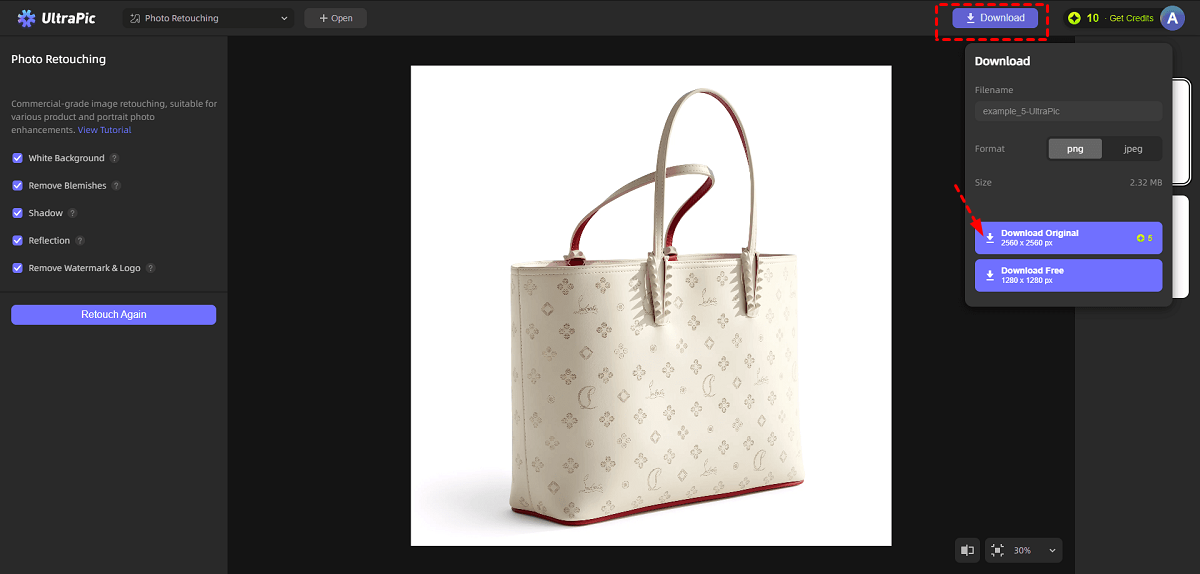
Step 1. Go to UltraPic's website with a browser, select the photo editing feature as needed (like Photo Retouching), and drag your image into the window, or browse PC to select it.
Step 2. Choose the features that best meet your editing goal, then the AI engine analyzes and improves the image automatically. Then, click on Start Retouching.
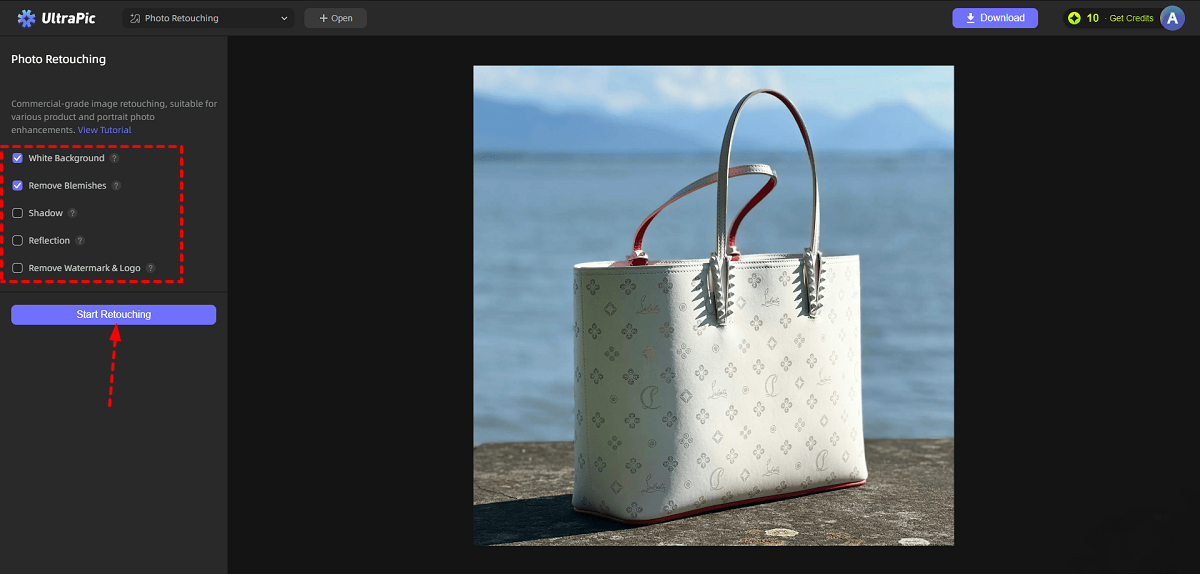
Step 3. When it’s done, review the result and tap on Download to export the retouched image.
Conclusion
Choosing the right photopea alternative online depends on your specific needs, skill level, and creative goals.
Canva is an excellent choice for beginners, marketers, and businesses that need fast design creation with templates and collaboration features. Pixlr offers a stronger traditional editing experience with useful AI tools and flexible adjustments. UltraPic stands out for users who want automated AI-powered enhancement, especially for Amazon product images, online stores, and marketing visuals.

