

Top 5 Best Free Background Remover Web Apps
Read this post to get the best 5 free background remover web apps to remove backdrop for photos online, working directly in the browser - no software installation required.

By Jonna Updated on March 11, 2026


Images play a huge role in marketing, social media, e-commerce, and personal branding. But sometimes the background of a photo can ruin an otherwise great shot. Maybe it’s cluttered, poorly lit, or simply distracting. That's when a free background remover web app becomes exceptionally useful.
Instead of spending hours manually editing images, modern AI-powered tools can remove photo backgrounds in seconds. They can usually automatically detect subjects, remove backgrounds, and eliminate shadows. In this guide, we will explore some of the best free web applications that help remove unwanted backgrounds from photos. Each tool provides unique features designed to simplify editing while maintaining high image quality.
5 Best Free Background Remover Web App
With so many tools available online, choosing the right one can feel overwhelming. Some focus purely on background removal, while others provide a completeonline photo background editor with design tools and AI enhancements. Below are 5 of the most reliable and widely used options available today.
UltraPic- One-Click AI Removal
UltraPic is an AI-powered image editing platform designed for fast and accurate background removal. As a free online photo background remover, UltraPic focuses on automation and speed. You can upload an image and instantly remove the background with no manual intervention.
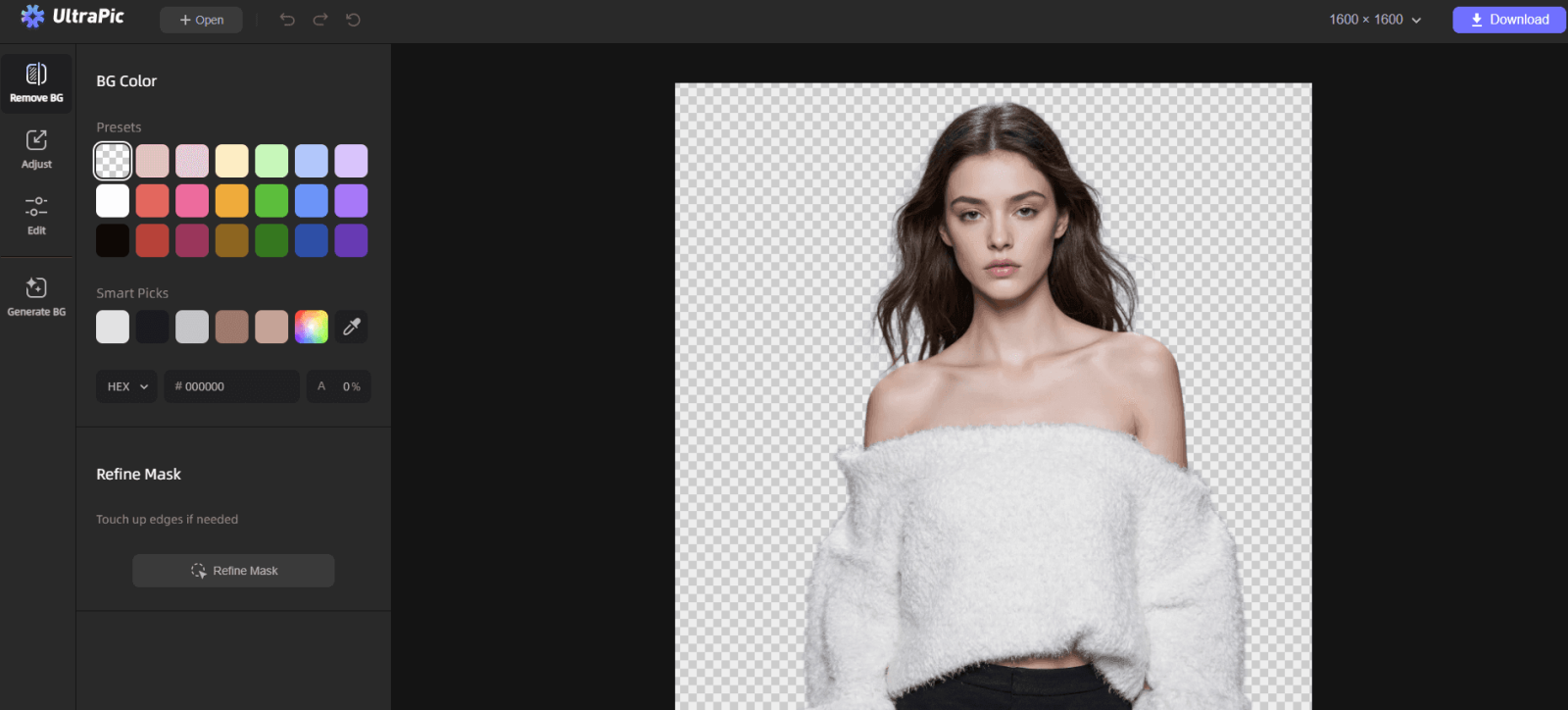
This tool relies on advanced vision algorithms that identify the main subject of the image automatically. Whether the image contains a person, product, pet, or object, it isolates objects from the background with impressive accuracy. And it delivers fast results while preserving important image details such as hair strands, edges, and shadows. This makes it especially useful for portraits and product photography.
💡 Multiple background options: Except for background removal, it can replace the background with a new solid color one, or generate a new background using recommended background scenarios, reference image, or text prompts.
💡 Batch processing: You are allowed to upload multiple images and remove background for multiple images online free simultaneously.
💡 Simple & efficient: Easy background removal, no software installation required, high-resolution image export for websites, e-commerce, or social media.
Remove.bg - Powerful AI background Remover
Remove.bg is one of the most popular online pic background removers dedicated specifically to background removal. It is widely used by photographers, designers, and businesses because of its highly accurate AI technology.

The platform focuses entirely on isolating subjects from backgrounds, which allows it to deliver extremely precise results. When you upload an image, Remove.bg analyzes the photo and automatically separates the foreground from the background in seconds. What makes Remove.bg stand out is its ability to handle complex images. Even photos with intricate details such as hair, fur, or transparent objects are processed accurately. Some of the most notable features include:
- High-quality edge detection
- Integration with professional editing tools
- API access for developers
- Transparent background export
Adobe Express- AI Tool Integrated with Adobe Ecosystem
Adobe Express is Adobe’s simplified creative platform designed for quick design and editing tasks. It includes an AI-powered background removal tool that allows users to remove backgrounds instantly while staying within the Adobe ecosystem.
Unlike tools focused solely on background removal, Adobe Express integrates editing, design templates, and branding tools in a single environment. This makes it ideal for users who want to create social media graphics, promotional visuals, or marketing materials. The background remover in Adobe Express works by automatically detecting the main subject and separating it from the surrounding environment. Some of the platform’s key features include:
- AI-driven background removal
- Integration with Adobe Creative Cloud
- Built-in design templates
- Quick image resizing for different platforms
- Brand kit management for businesses
Canva- All-in-one Creative Platform
Canva is widely recognized as one of the most popular online photo background editors. Known for its user-friendly interface and massive library of templates, Canva also includes a powerful background removal feature.
Within the Canva editor, users can upload images and instantly remove the background with a single click. After removing the background, the subject can be placed into any design layout, making Canva an excellent tool for creating promotional graphics, presentations, and social media posts. Canva’s background removal technology works well for the most common image types, including portraits, profile pictures, product images, and lifestyle photography. Key features include:
- Large library of design templates
- Extensive stock image collection
- Easy export options for social media platforms
Fotor- All-in-One Photo Editor
Fotor is another comprehensive online photo editor that includes AI background removal alongside many other editing tools. Instead of focusing exclusively on background removal, Fotor offers a full set of features designed to enhance and modify images.
You can remove backgrounds, adjust lighting, apply filters, retouch portraits, and improve image clarity within the same interface. As a free background remover web app, Fotor uses AI algorithms to detect subjects automatically. Once the background is removed, users can either download the transparent image or replace the background with a new design.
- Photo enhancement tools
- Photo retouching features
- Creative filters and effects
FAQs on Free Background Remover Web App
1️⃣ What is the best free background remover?
The best free background remover web app depends on your needs and editing style.
- UltraPic is ideal for quick one-click background removal with minimal effort.
- Remove.bg offers exceptional accuracy for complex subjects and detailed edges.
- Adobe Express works well for users already within the Adobe ecosystem.
- Canva is perfect for combining background removal with graphic design.
- Fotor provides a broader photo editing environment alongside background removal.
2️⃣ Can ChatGPT remove background from image?
Yes, ChatGPT can remove the background from images using GPT-4o and specialized GPTs, making subjects transparent or isolating them.
3️⃣ How to remove backgrounds without Photoshop?
Removing backgrounds without Photoshop is easier than ever thanks to browser-based tools. Simply upload your photo to an online photo background remover> let the AI detect the subject> download the image with a transparent background.
4️⃣ How accurate are background removers?
Modern AI background removers are surprisingly accurate. They can detect subjects and isolate complex edges with high precision. Accuracy often depends on factors such as:
- Image resolution
- Contrast between subject and background
- Lighting conditions
- Complexity of shapes within the image
5️⃣ What are common background removal mistakes?
While AI tools are powerful, certain mistakes can reduce image quality.
- Uploading low-resolution images
- Editing photos with extremely cluttered backgrounds
- Ignoring edge refinement around hair or thin objects
- Placing the subject on unrealistic replacement backgrounds
- Over-editing lighting or shadows
Avoiding these issues helps ensure that the final image looks natural and professional.
Conclusion
Background removal has evolved dramatically over the past decade. What once required hours of manual editing in professional software can now be accomplished in seconds using AI-powered tools. A free background remover web app makes this technology accessible to everyone - from photographers and designers to online sellers and social media creators. With just a few clicks, users can remove distracting backgrounds and create clean, professional-looking images.
Choosing the right tool ultimately depends on your specific needs. If you want quick background removal, using a dedicated AI online photo editor, like UltraPic, to remove background may be the best choice.


