

5 Best AI PFP Generators: Create Custom Profile Pictures
AI PFP generator helps to create custom profile pictures (PFPs) from text prompts or by transforming uploaded photos into various artistic styles. Here are 5 top options for you!

By Jonna Updated on February 6, 2026


AI PFP generators work by analyzing facial features, lighting, angles, and expressions from uploaded photos. Using deep learning models trained on massive datasets, they generate new images that resemble you while applying enhancements or creative styles. The result can be hyper-realistic, slightly polished, or intentionally artistic, depending on what you choose.
What makes AI-generated PFPs so appealing is flexibility. You can look professional without looking stiff. You can look creative without looking unpolished. And you can do it without reshoots, makeup sessions, or expensive tools.
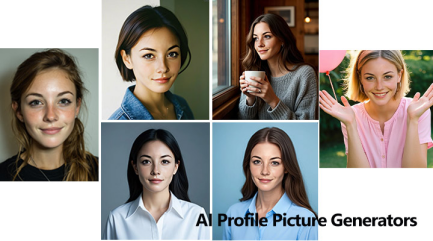
What Are the Factors to Take into Consideration for PFPMakers?
Different PFP creators have different features. Some prioritize realism, others lean into creativity, and a few focus on speed over quality. Choosing the right one depends on your goals and where the PFP will be used. Before choosing a AI profile picture maker, it helps to evaluate several key factors that directly affect results and usability.
- Image quality and realism: Does the AI preserve natural facial features, or does it produce overly smooth, artificial faces?
- Style flexibility: Can you choose professional, casual, or artistic looks?
- Ease of use: Is the interface intuitive, or does it require technical tweaking?
- Privacy and data handling: Are uploaded photos stored, reused, or deleted after processing?
- Output resolution: Are the final images sharp enough for modern displays?
- Cost transparency: Is it a PFP maker free? Or, is pricing clear, or are features locked behind unclear paywalls?
Top 5 AI PFP Generators in 2026
AI portrait tools have matured significantly, and several platforms now stand out for reliability, image quality, and user experience. Below are 5 PFP AI generators that lead the list.
Aragon
Aragon focuses on realism and professionalism. It is often used for business headshots, LinkedIn profiles, and formal branding needs. Aragon analyzes facial structure in depth, aiming to produce images that look like they were taken by a professional photographer. The lighting is subtle, expressions are natural, and the overall tone leans polished rather than playful.
What sets Aragon apart is consistency. The generated images tend to stay close to your real appearance, making them ideal for platforms where authenticity matters. It may not be the most experimental tool, but it excels at credibility.
Key features:
- Ultra-realistic portrait generation
- Studio-style lighting simulation
- Business and casual profile options
- Photo-based AI training
Cons:
- Limited artistic or cartoon styles
- Requires uploading personal photos
- Premium pricing model
Pricing:
One-time purchase plans for AI headshotsstarts from Basic plan at $35 with 40 headshots, 1 outfit/background choice.
BetterPic
BetterPic lives up to its name by emphasizing refinement. It enhances facial clarity, posture, and lighting while keeping the image approachable. This generator is popular among freelancers and remote workers who want a clean, friendly profile picture without heavy stylization. The AI smooths imperfections gently rather than aggressively, which helps avoid the "AI face" look.
BetterPic also performs well with imperfect input photos. Even if your original images were taken casually, the output often feels intentional and balanced.
Key features:
- AI-enhanced portrait generation
- Background and outfit variations
- Balanced realism and stylization
- Multiple output styles per session
Cons:
- Fewer extreme art styles
- Some features require subscription
Pricing:
One-time paymentfor Basic plan at $35 with 20 Headshots, 1 style, and 2 AI Edits.
Portrait Pal
Portrait Pal PFP generator with AI leans into personalization. Instead of pushing a single aesthetic, this free PFP makerallows users to explore different moods and tones. Some outputs feel cinematic, others feel editorial, and some look like casual lifestyle portraits. This flexibility makes Portrait Pal appealing to creators, artists, and people who want their PFP to stand out without feeling cartoonish.

While the results can vary depending on the input photos, the best outputs are expressive and memorable. Portrait Pal is less about uniformity and more about individuality.
Key features:
- AI-generated illustrated and semi-realistic portraits
- Expression-focused outputs
- Style presets for different moods
- No advanced editing required
Cons:
- Less suitable for formal use
- Lower realism compared to others
Pricing:
Free version with low-priority, lower resolution, watermarked images; and Starter plan costs $35 for 20 high-quality headshots.
Canva
Canva isn't exclusively a PFP AI generator, but its AI image tools, templates, and background features make it a powerful option for creating profile pictures as part of larger designs. You can generate or enhance portraits, then immediately place them into templates, banners, or social graphics. This makes Canva ideal for people who want both a PFP and cohesive visuals across platforms.
The AI portraits themselves are solid, though not always as detailed as specialized tools. The real strength lies in workflow efficiency and creative integration.
Key features:
- AI image generation and editing
- Built-in templates for social platforms
- Background removal and enhancement
- Text and graphic overlays
Cons:
- Extremely versatile
- Beginner-friendly interface
- Strong design ecosystem
Pricing:
Free version with limited AI credits and some headshot to use; Canva Pro for $12.99/month for more AI credits, premium images, background tools.
Fotor
Fotor blends AI generation with traditional photo editing. It offers AI-powered portrait creation alongside tools for retouching, background changes, and color adjustments. This hybrid approach appeals to users who want more control after generation. You can fine-tune lighting, contrast, and composition instead of accepting a single final output.
Fotor’s AI PFP results are versatile and accessible, especially for users who enjoy hands-on editing without needing professional software.
Key features:
- AI portrait generation
- One-click background changes
- Image enhancement tools
- Web and mobile access
Cons:
- Limited customization depth
- Less control over final style
Pricing:
Fotor Basic is free with limited free tools and credits; Fotor Pro costs $3.99/month with more AI tools, HD export, batch options.
Best Picture Editing AI Tool Online Free - UltraPic
UltraPic is a free online AI image editing tool designed to enhance, clean up, and adjust photos quickly. It doesn’t replace AI PFP generators. Instead, it complements them by polishing the final result. For pictures, UltraPic is especially useful for background cleanup, lighting correction, and subtle enhancements. It works directly in the browser, which keeps the process simple and accessible.
UltraPic focuses on practical improvements rather than dramatic transformations. Its AI is trained to enhance clarity while preserving realism.
- AI-powered background removal and replacement
- Smart edge detection for clean cutouts
- Automatic lighting and contrast enhancement
- Support for high-resolution image output
- No software installation required

Create Studio-Quality Product Photos with AI
Make product images clean, professional and conversion-ready.
- Remove messy backgrounds in one click effortlessly
- Generate eye-catching custom backdrops for photos
- Boost clicks and sales with better product images
- No design or editing skills needed, instant result


You can directly go to the AI photo editing tool, drop to upload your image, and edit it by removing the backdrop, refining mask, retouching photos, and so on.
In the End
AI PFP generators empower individuals to control how they appear online, whether the goal is professionalism, creativity, or approachability. Different option may serve different needs. Some focus on realism, others on flexibility, and some on creative integration. Choosing the right one depends on where your PFP will live and what impression you want it to make.
Also, paring tools like UltraPic help you refine your picture by removing unwanted objects from photos so it looks intentional, polished, and ready for any platform.

