

Best Online Image Upscaler - 8x Image Resolution with AI
In this guide, we'll clear up the confusion between image upscaling, enhancing, and enlarging, introduce an AI online image upscaler, UltraPic, and walk through exactly how to use it.

By Jonna Updated on July 8, 2026


You've got a photo you absolutely love, but the resolution is so low it looks like a smudge the second you try to print it or post it anywhere decent. A reliable online image upscaler can transform the photo into a crisp, clear one in seconds, ready to show off. In this guide, we'll clear up the confusion between image upscaling, enhancing, and enlarging, and introduce a useful tool to help you upscale images online free.
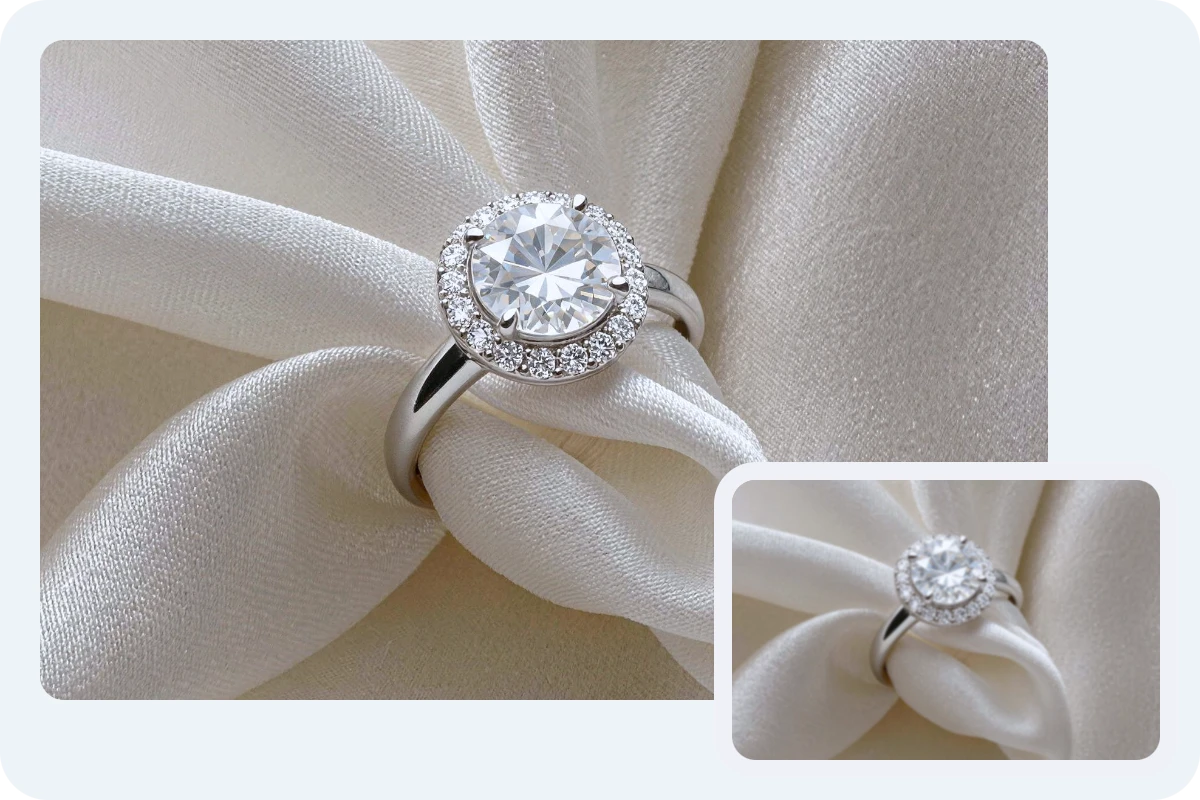
Image Upscale vs Enhance vs Enlarge
Image upscale refers specifically to increasing an image's pixel dimensions using AI or algorithmic methods that reconstruct detail as the image grows. It's not just about making something bigger; it's about making it bigger while keeping (or even improving) the clarity. This is the process most people mean when they talk about performing 4K image upscaling.
Image enhance, on the other hand, focuses on improving the existing quality of an image without necessarily changing its size. Think sharpening, noise reduction, color correction, and contrast balancing. You could enhance a photo that's already the "right" size but just looks a little flat, dull, or grainy.
Image enlarge is the simplest and oldest of the three. It just means making an image physically bigger, often through basic stretching or resampling, without any real intelligence behind the process. This is the classic "drag the corner and hope for the best" approach, and it's exactly why so many enlarged images end up looking blurry or pixelated.
|
Process |
What it does |
Increase Resolution |
Improve Detail/Clarity |
Typical use cases |
|
Upscale |
Increases pixel dimensions using AI reconstruction |
Yes |
Yes |
Enlarging low-res photos for print or display |
|
Enhance |
Improves sharpness, color, and noise levels |
No |
Yes |
Fixing dull, grainy, or poorly lit photos |
|
Enlarge |
Stretches an image to a bigger size |
Yes |
No (may decrease) |
Quick resizing without quality concerns |
Free Online Image Upscaler and Enhancer - UltraPic
UltraPic is a free AI-powered image enhancement platform designed to improve image quality quickly and efficiently. Its AI image upscaler can enlarge images up to 8x resolution while maintaining sharper details, clearer edges, and improved textures. It uses artificial intelligence to analyze images before processing them. This allows for restoring details that may be missing from low-quality photos and creating a more natural-looking visual.

Create Studio-Quality Product Photos with AI
Turn low-res photos into crisp, high-resolution images with AI.
- Boost image resolution up to 4x in just seconds.
- Fix blur, noise, and dull colors for picture-perfect results.
- Perfect for enlarging product shots without pixelation.
- No design or editing skills needed, instant result.


This best AI image upscaler can also reduce blur and pixelation to help you cope with images downloaded from social media or messaging apps that suffer from compression artifacts. And it maintains realistic color balance while subtly improving vibrancy. Besides, UltraPic offers additional editing capabilities that help users create polished visuals.
🟢 AI Background Remover - Remove backgrounds from portraits, products, pets, vehicles, and other objects with remarkable precision and generate a new BG with studio visuals.
🟢 AI Object Remover - Erase unwanted elements such as tourists, wires, watermarks, logos, text, blemishes, or distracting objects while seamlessly filling the surrounding area.
🟢 Photo Retouching - Improve product photos by refining backgrounds, removing unwanted elements, and improving visual details, making images cleaner, sharper, and more attractive.
🟢 AI Generative Fill - Replace missing areas, extend scenes, or add entirely new objects using intelligent AI generation based on the surrounding image content.
How to Upscale a Low-Quality Image with UltraPic
Upscaling image online for a low-resolution image does not have to be complicated. With an AI-powered online image upscaler like UltraPic, the process can be completed in just a few steps.
Step 1. Upload your image to the UltraPic AI image upscaler platform by clicking the upload button or dragging the file directly into the browser window.
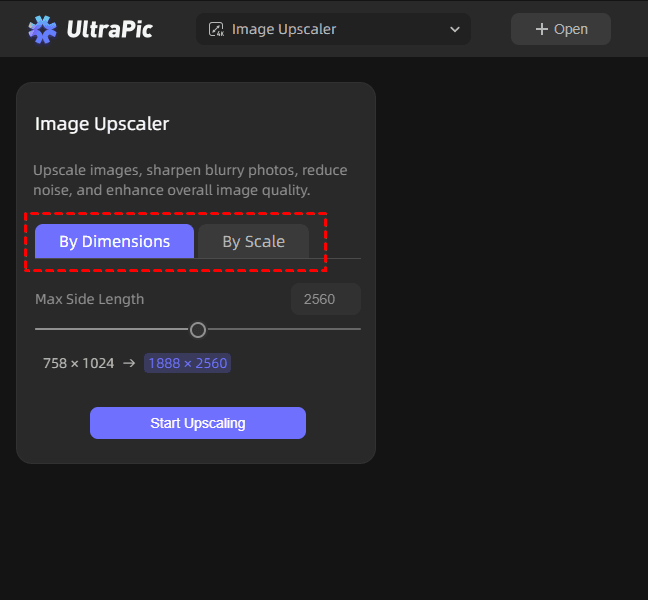
Step 3. Select your desired upscale mode - By Dimensions or By Scale, and then choose the side length or choose 2x, 3x, 4x, or up to 8x, depending on how large you need the final image to be.
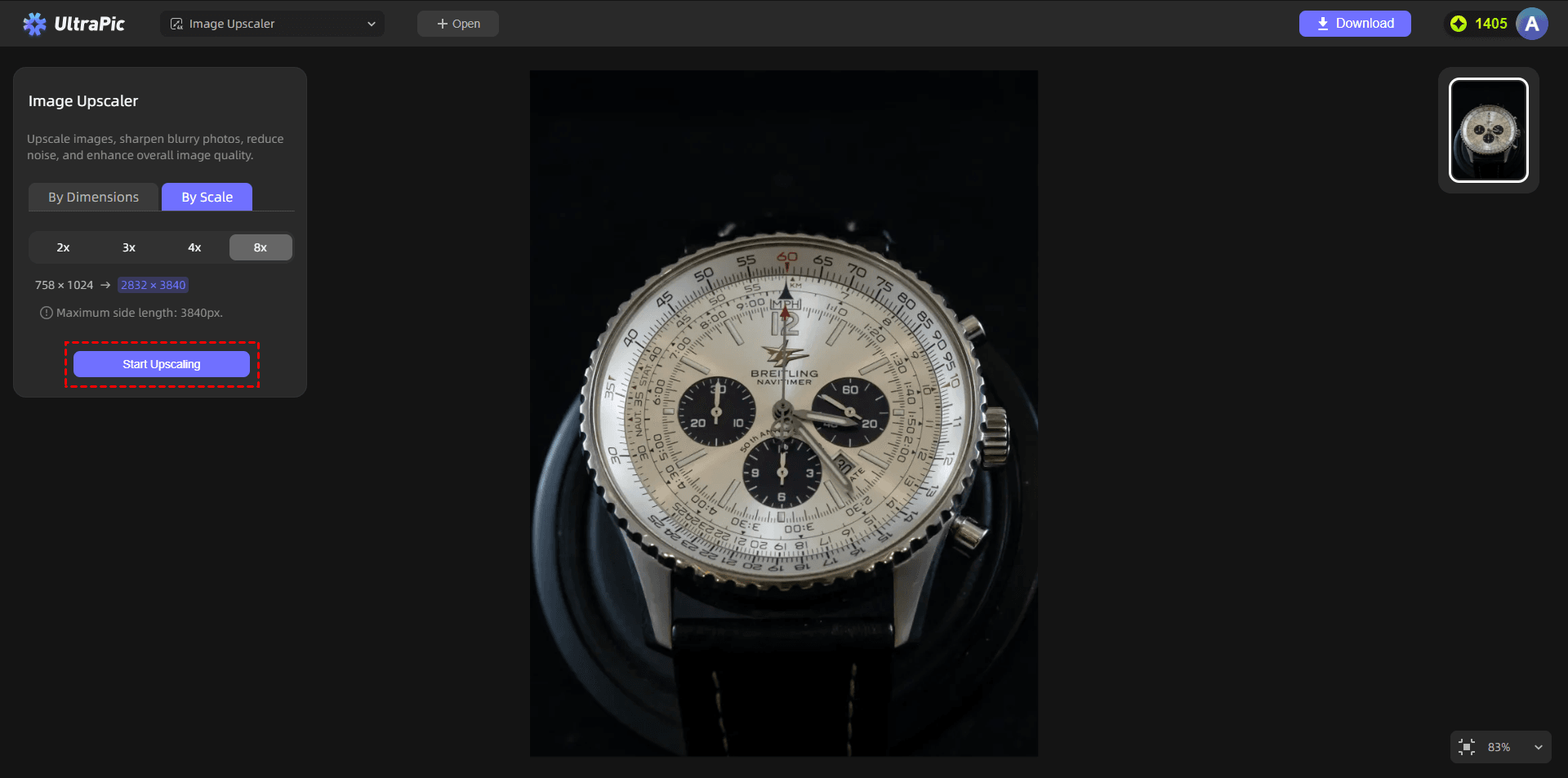
Step 4. Click on Start Upscaling and let the AI engine analyze the image and reconstruct missing detail.
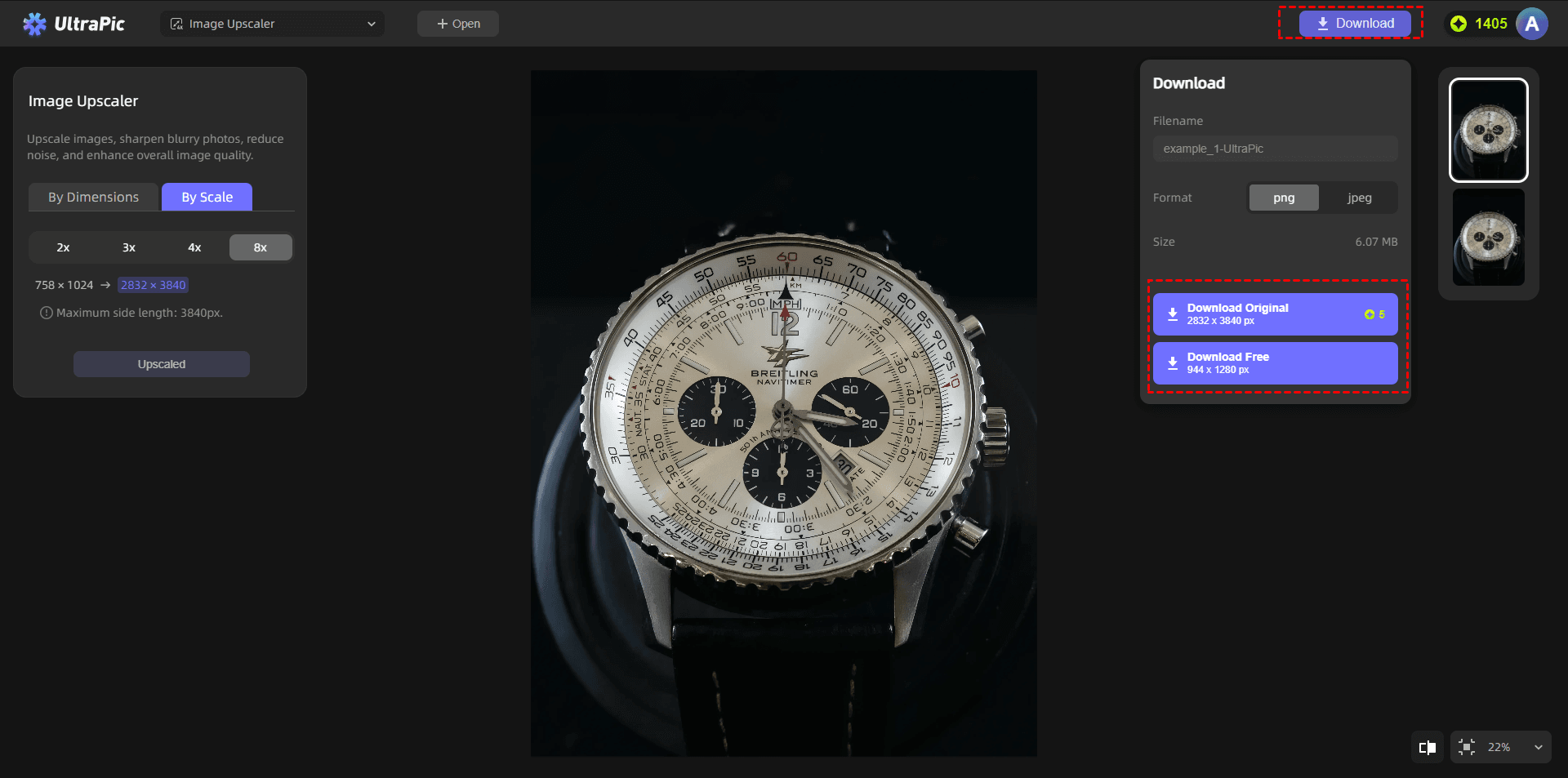
Step 5. Review the before-and-after preview to see exactly how much sharper and larger the image has become. Then, click Download to get your upscaled image.
How to Enhance Your Image using UltraPic
Image enhancement is not only about increasing resolution. A visually appealing image also requires proper lighting, sharpness, and balanced details. UltraPic helps users enhance images by improving clarity and correcting common quality problems. The AI technology analyzes the image and applies intelligent adjustments to create a cleaner appearance.
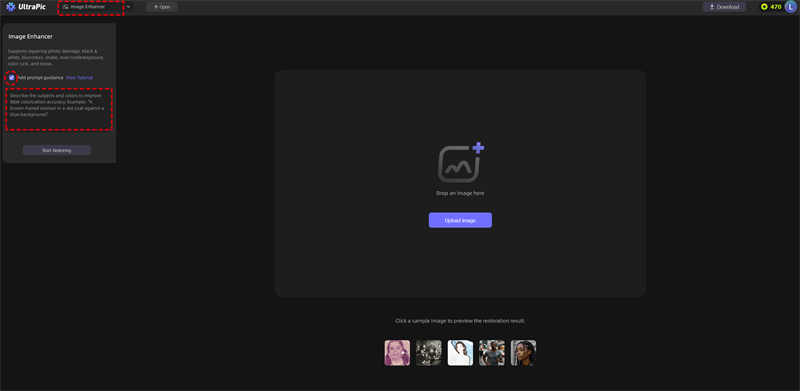
Step 1. Navigate to Image Enhancer on UltraPic and upload the image you'd like to enhance.
Step 2. (Optional) Tick Add prompt guidance to add the text description about the enhancements to apply, such as noise reduction, sharpness correction, or color balancing.
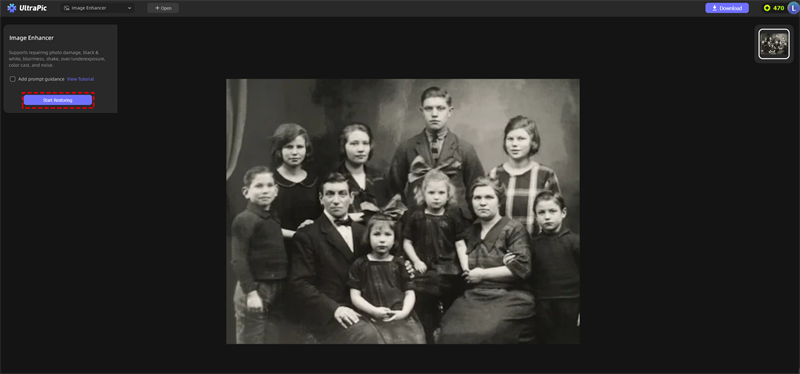
Step 3. Then, click on Start Restoring. Then, download the finished image, ready for printing, posting, or sharing.
FAQs on Image Upscaling
#1. Does upscaling improve image quality?
Yes, AI upscaling can improve image quality by increasing resolution and reconstructing missing details. Traditional enlargement only increases image dimensions, but AI-based methods analyze the image content and generate additional details to create sharper results.
However, upscaling cannot magically restore every lost detail from an extremely damaged image. The final quality depends on the original image condition and the AI technology being used.
#2. Can upscaling fix blurry images?
AI upscaling can reduce blur and improve image clarity, but the results depend on the type and severity of the blur. Images affected by low resolution, compression, or slight softness usually respond well to AI enhancement. The technology can identify patterns and improve unclear areas.
However, extremely blurry images with completely missing information may not become perfectly sharp. AI can estimate details, but it cannot recover information that was never captured.
#3. How to make blurry pictures higher quality?
The most reliable approach combines both upscaling and enhancing. Using a platform like UltraPic makes this especially convenient, since both processes live in the same place.
Conclusion
Image quality plays an important role in modern digital communication. Whether you are creating marketing content, managing an online store, or preserving personal memories, clear and detailed images create a stronger impact. A reliable online image upscaler makes it easier to transform small, blurry, and low-resolution images into sharper, higher-quality visuals.
UltraPic provides an easy way to upscale images up to 8x while combining resolution improvement with powerful enhancement features. Whether you're restoring an old family photo, sharpening product shots, or just want your social media posts to look their absolute best, give it a try. Also, you can use this free image upscaler to remove unwanted objects from photo, replace objects on photos with AI, and so on.

