

Free Transparent Background Tools - Remove BG from Image Easily
This article will show you the best free transparent background tools to instantly separate subjects from backgrounds and export images with transparent layers easily.

By Jonna Updated on March 13, 2026


Why Need Transparent Background?
A transparent background allows an image subject to stand alone without any visible background color or environment. Instead of being locked into a specific scene, the subject can be placed on any new background. One of the most common uses is in e-commerce. Online marketplaces often require product images with clean white or transparent backgrounds to maintain visual consistency across listings.
Transparent backgrounds are also widely used in graphic design. Designers frequently combine different visual elements such as icons, logos, product photos, and illustrations. When these elements have transparent backgrounds, they can easily be layered and positioned without awkward edges or mismatched backgrounds. A free transparent background tool makes it easy to create such images without complex editing.
Best Free Transparent Background Tools in 2026
Below are six of the best free transparent background makers. These tools help to identify the main subject in an image and remove the background instantly.
#1. Canva
Canva has become one of the most widely used design platforms in the world. Known for its user-friendly interface and extensive template library, Canva also includes a background remover tool that can create transparent images with just a few clicks. Also, Canva combines editing and design tools in one platform. You can remove the background and immediately place the subject into marketing graphics or product layouts.
The platform is particularly popular among social media marketers, small business owners, and content creators who want an all-in-one design solution. Key advantages of Canva include:
- Integrated design environment with templates and graphics
- Automatic background removal powered by AI
- Easy drag-and-drop editing tools
- Cloud-based access from any device
- Quick export options, including transparent PNG files
#2. UltraPic
UltraPic is an AI-powered online image editing platform designed specifically for fast background removal and photo enhancement. It focuses on automation, allowing users to remove backgrounds instantly without manual adjustments. The system analyzes uploaded images and separates the subject from the background using advanced vision algorithms to make image transparent online hassle-free.

Remove Backgrounds from Images in Seconds
Get clean, conversion-ready product photos instantly with AI.
- 100% automatic background removal for product pics
- Preserve every detail, keep edges sharp and clean
- Make product listings look polished to boost sales
- Save hours of manual editing using our AI tool now


UltraPic is especially useful for e-commerce sellers who need clean product images quickly. Some notable features include:
- One-click AI background removal
- High-precision subject detection
- Drag-and-drop image editing
- Support for complex objects, such as hair or transparent items
- AI photo retouching & object removal from image
- Batch image processing quickly
#3. Adobe Express
Adobe Express is part of Adobe's growing ecosystem of cloud-based creative tools. Designed for simplicity, it provides quick editing features while maintaining the reliability of Adobe’s image processing technology.The background remover in Adobe Express works seamlessly with other design tools within the platform.

Adobe Express appeals to designers who appreciate the reliability of Adobe software but prefer a simplified editing workflow. Some benefits of Adobe Express include:
- AI-driven background removal
- Integration with Adobe Creative Services
- Built-in templates for social media and marketing graphics
- High-quality export options
- Web-based editing with minimal system requirements
#4. remove.bg
remove.bg is one of the most well-known AI background removal services on the internet. The platform specializes exclusively in removing backgrounds, making it highly optimized for this task. Users simply upload an image, and the system automatically removes the background within seconds.
Because of its speed and simplicity, many designers consider it one of the most reliable tool options available to make background transparent free today. Some strengths of remove.bg include:
- Extremely fast background processing
- Accurate subject detection for people and objects
- Clean edges and detailed cutouts
- API integration for developers
- Easy downloads with transparent backgrounds
#5. Photoroom
Photoroom is widely used among e-commerce sellers and product photographers as a transparent background maker free. The platform not only removes backgrounds but also provides tools for creating product photos, marketing images, and social media graphics. Photoroom uses AI to detect products and optimize their presentation automatically.
Photoroom helps users create professional product visuals without needing advanced design skills. As a result, it has become a popular free transparent background tool to convert image to transparent background online. Its key features include:
- Instant background removal
- Built-in product photography templates
- AI-generated backgrounds and scenes
- Batch editing for multiple images
- High-resolution exports for online stores
#6. Pixelcut
Pixelcut is another AI-based image editing platform designed for creators and small businesses. It focuses on simplifying product photography and design workflows. In addition to background removal, Pixelcut offers tools for generating product scenes, shadows, and reflections.
Pixelcut combines design flexibility with automated editing, making it a tool to make background transparent online for entrepreneurs and content creators. Its key highlights include:
- AI-powered background removal
- Automatic shadow generation
- Product photo enhancement tools
- Social media and marketing templates
- Mobile-friendly editing interface
How to Make a Background Transparent for Free
Let’s walk through a simple step-by-step guide to use UltraPic - the free online tool to make image background transparent.
Step 1. Visit the UltraPic Background Remover, upload the photo that contains the subject you want to isolate.
Step 2. This tool automatically analyzes the image and removes the background. You can zoom in and out to check the edges of the subject to ensure they appear clean and natural.
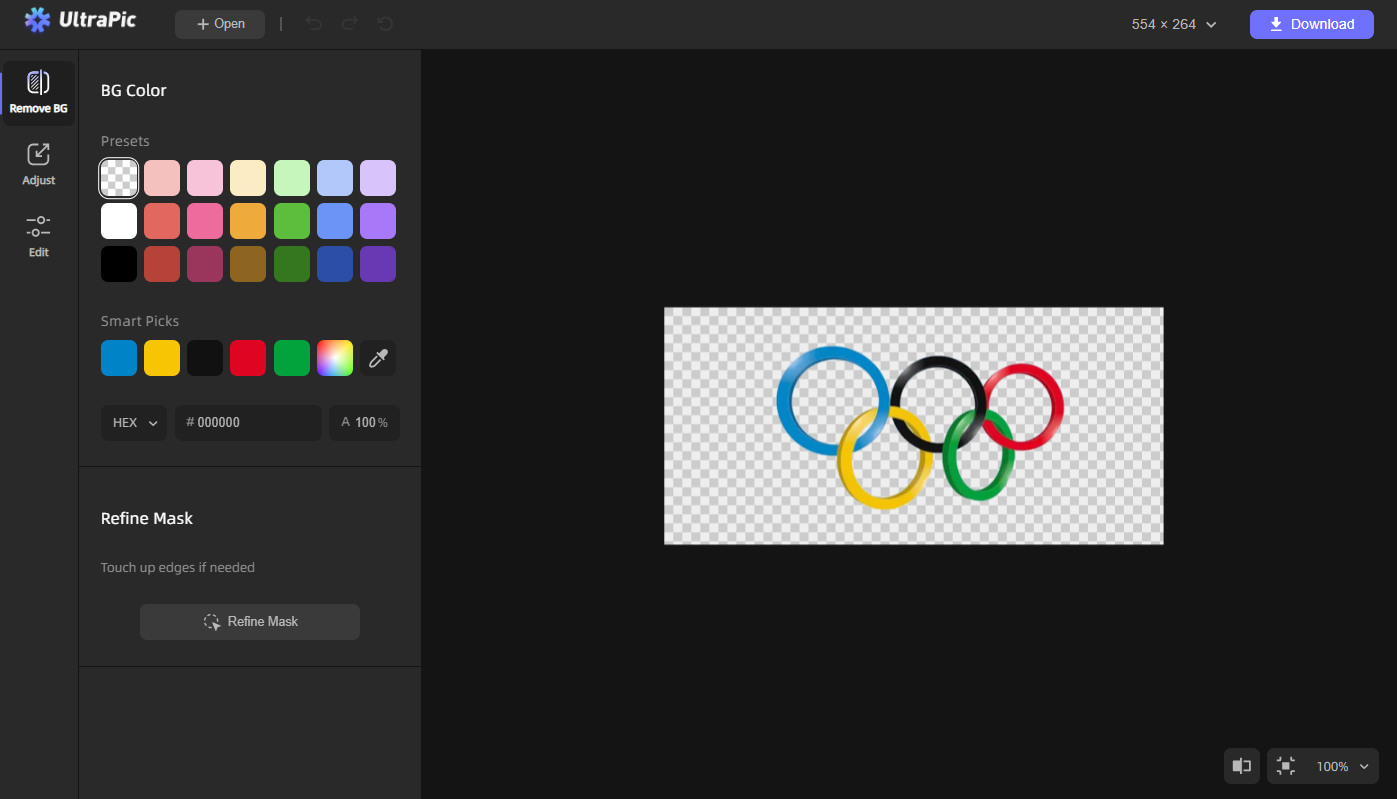
Step 3. Click Download to export the final image as a PNG file with a transparent background.
👉Tips:
- To remove the backgrounds for multiple images, just use the UltraPic Batch Editor.
- After background removal, you can edit its light, color, and detail as needed; and its Generate BG is available to generate custom backdrops with AI.
Conclusion
Transparent backgrounds have become an essential element of modern visual design. They allow images to blend seamlessly into different layouts, making them ideal for e-commerce listings, marketing graphics, and branding materials.
Tools like UltraPic offer an easy solution to isolate subjects and generate transparent images instantly. Also, it offers functions like changing background, watermark removal, object removal, and so on.

