

Best Free Image Upscaling Software | Enlarge Images Online Easily
Follow this guide to explore what image upscaling really means and how to use the best free image upscaling software to enhance images online with ease.

By Jonna Updated on July 6, 2026


Ever zoomed in on an old photo only to watch it dissolve into a blurry mess of squares? Yeah, we've all been there. That grainy, pixelated look is the bane of anyone who's ever tried to blow up a small image for a print, a presentation, or just a nicer profile picture.
The good news is that you don't need design skills to fix it anymore. With the right free image upscaling software, you can turn a fuzzy, low-res picture into something crisp and share-worthy in seconds. In this guide, we'll walk through what image upscaling actually is, introduce a standout free image upscaling app, and show you exactly how to perform 4K image upscaling step by step.
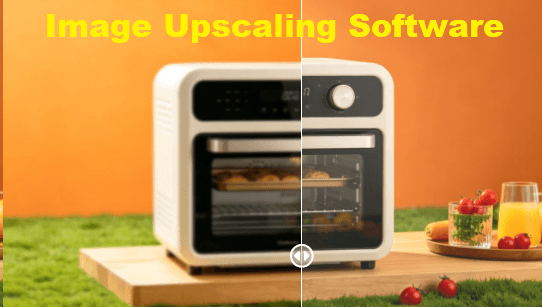
What is Image Upscaling?
Image upscaling is the process of increasing the resolution of an image while maintaining or improving its visual quality. In simple terms, it allows you to make a small image bigger without turning it blurry or pixelated.
Traditional resizing methods simply stretch pixels, which often results in a loss of clarity. Edges become soft, textures disappear, and the image looks unnatural. This is where modern free image upscaling software stands out. Instead of stretching pixels, AI-based upscaling tools analyze the image and predict what additional details should look like. They reconstruct textures, sharpen edges, and fill in missing information using deep learning algorithms.
|
Traditional Resizing vs. AI Image Upscaling |
|
|
Traditional resizing |
AI image upscaling |
|
|
There are a few common use cases where image upscaling is really useful:
- E-commerce product shots that need to look sharp when zoomed in on a website.
- Old family photos that were scanned at low resolution need to be fixed.
- Social media graphics that get stretched across different platforms and screen sizes.
- Printing projects, where a low-res image would otherwise come out grainy on paper.
- Restoring old artwork or documents where the original file quality just isn't cutting it anymore.
Best Free Online Upscaling Software - UltraPic
UltraPic is one of the most efficient and user-friendly platforms that allows you to upscale image free online. It eliminates the need for complex desktop applications and allows you to enhance image resolution in just a few clicks. Whether you're working with product photos, portraits, or digital artwork, it delivers clean, high-resolution results without requiring technical expertise.

Create Studio-Quality Product Photos with AI
Turn small, blurry or pixelated photos into crisp, high-resolution images instantly.
- Enlarge photos up to 4x while keeping every detail sharp
- Recover lost clarity from low-resolution or compressed images
- Perfect for product catalogs, prints and large ad formats
- No design or editing skills needed, instant result


Except for intelligently enlarging images while reconstructing fine textures, edges, and details, this free AI image upscaling software provides a range of features designed for both beginners and professionals:
- 👉 AI Image Enhancement - In addition to increasing resolution, free image upscaling software can automatically improve overall image quality to increase clarity, enhance colors, reduce image noise, and restore faded photos.
- 👉 AI Photo Retouching - It helps automatically detect and remove blemishes, acne, dust spots, or small imperfections to refine the content of a photo.
- 👉 Background Removal - It also includes an AI-powered background remover that automatically isolates subjects from distracting backgrounds.
- 👉 AI Object Removal - It can remove unwanted objects, text, watermarks, or distractions while preserving surrounding image quality.
This best image upscaling software focuses on automation, meaning users simply need to upload an image and let the AI handle the rest.
How to Enlarge Images Online with UltraPic
Using UltraPic is designed to be straightforward, even for complete beginners. You don’t need editing experience or software installation. Here's how to use this image upscaling software free:
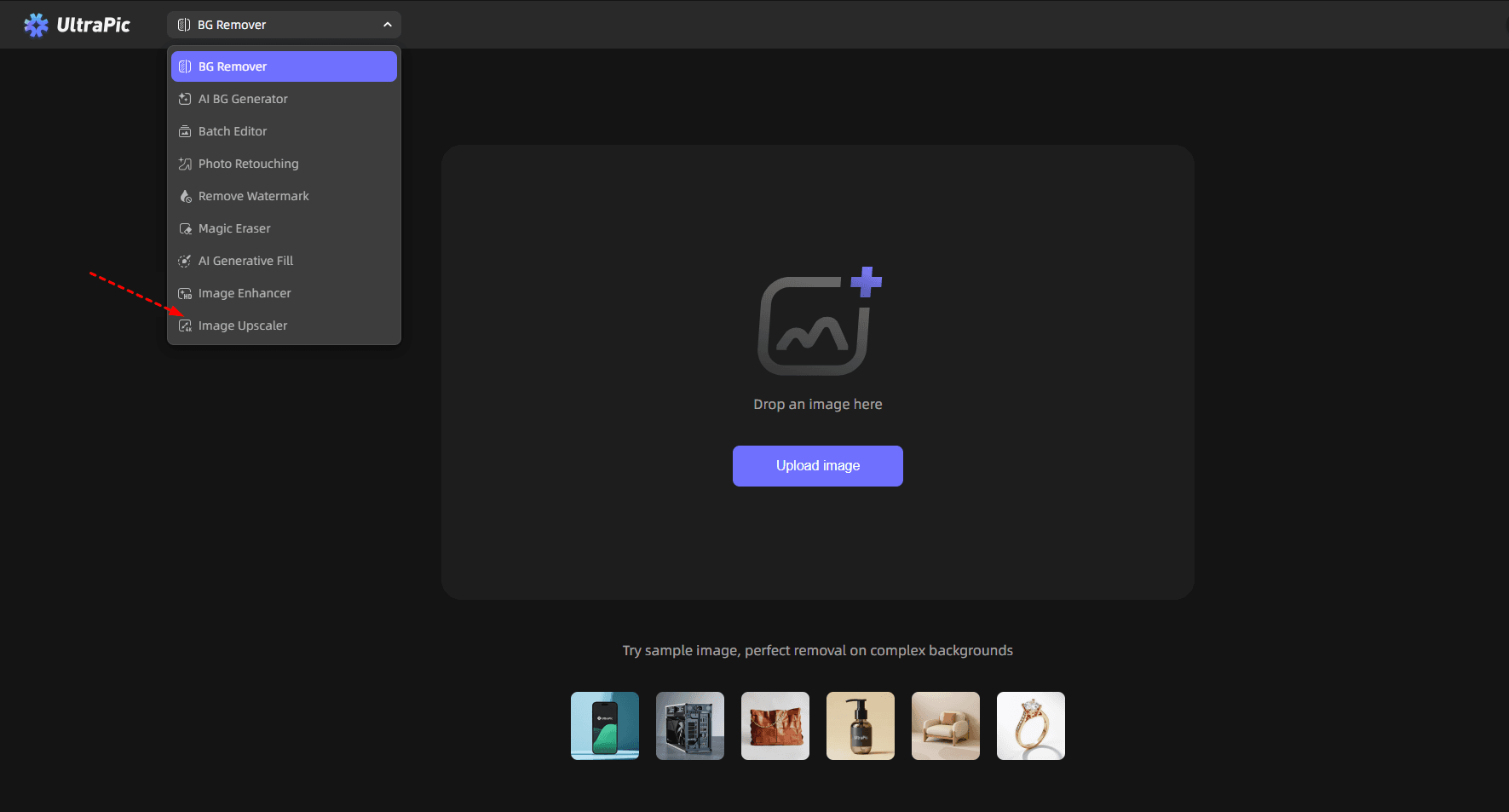
Step 1. Open the UltraPic app in your browser and select the Image Upscaler tool. Then, upload the image you want to upscale.
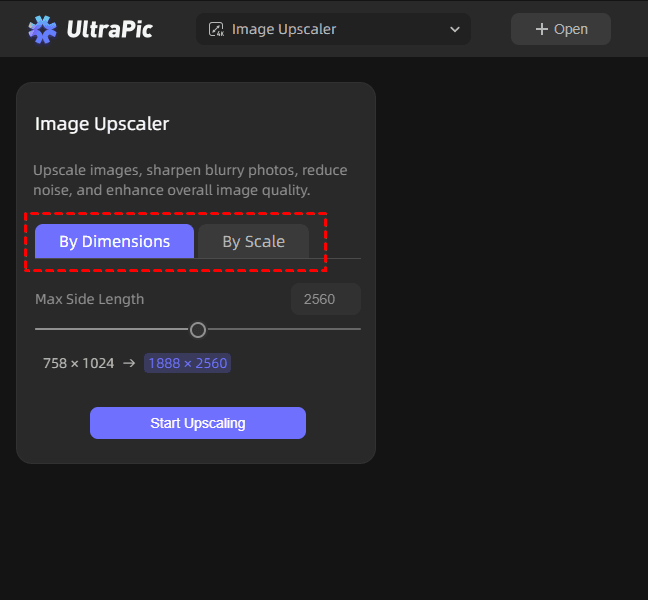
Step 2. Select to upscale images By Dimensions or By Scale - offering up to 8x upscaling, then click on Start Upscaling.
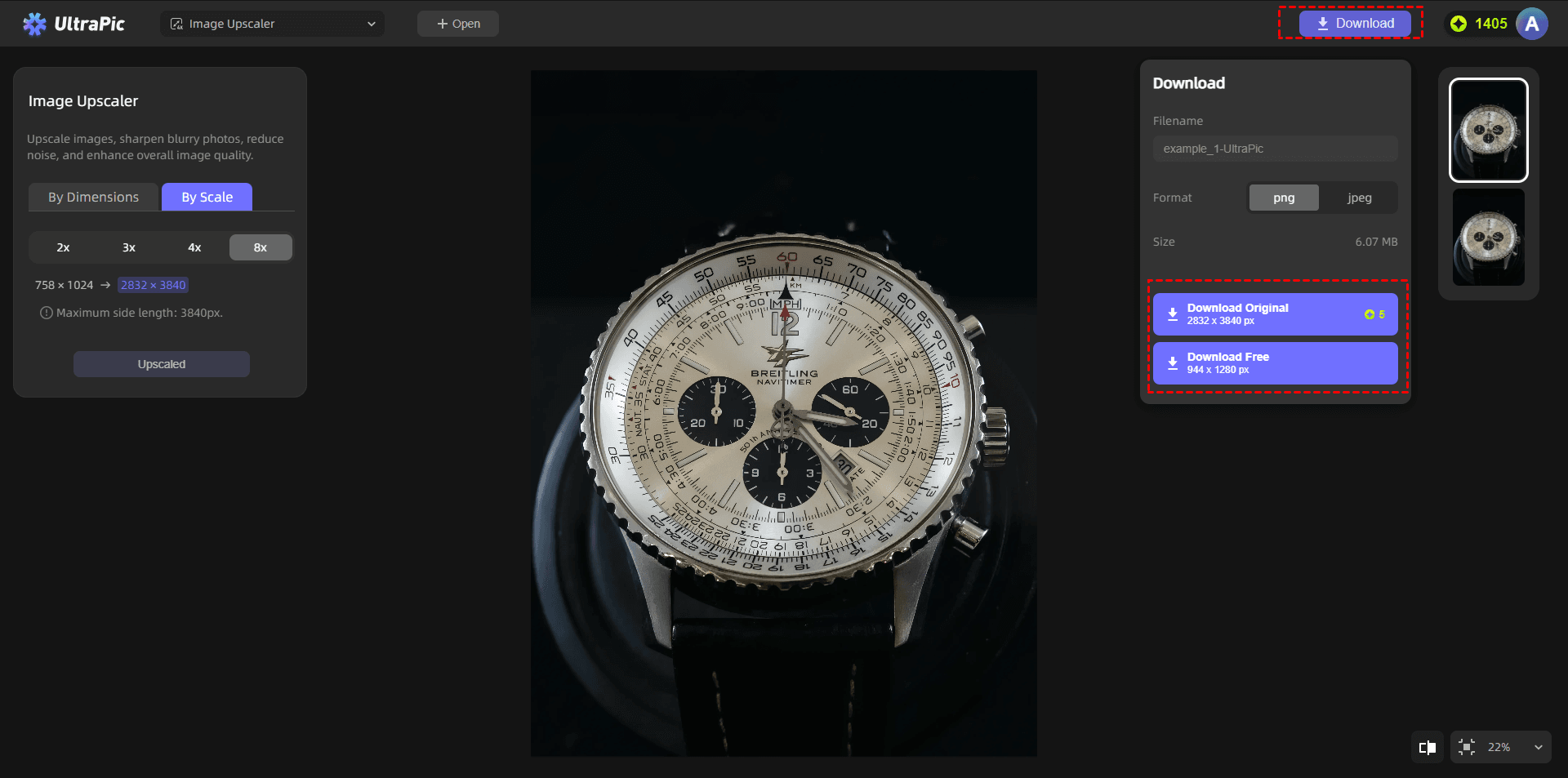
Step 3. Let its AI process and enhance the image. Then, preview the result and click Download to get a new, high-resolution image.
FAQs on Image Upscaling Software
1️⃣ How does image upscaling work?
Image upscaling works by increasing the resolution of an image while preserving or enhancing its quality.
Traditional methods simply stretch pixels, which often causes blurriness. AI-based tools, however, analyze patterns in the image and generate new pixel data based on learned visual information.Modern systems use deep learning models trained on large datasets. These models understand textures, edges, and shapes, allowing them to reconstruct missing details intelligently.
2️⃣ Why choose free image upscaling software over manual resizing?
Manual resizing tools only increase image dimensions without improving quality. This often leads to pixelation and loss of detail.In contrast, AI-based tools offer several advantages:
- Better preservation of image quality
- Automatic enhancement of details
- No technical skills required
- Faster processing time
- More professional results
3️⃣ Which file formats work best with free image upscaling software?
Most modern upscaling tools support common image formats, but some work better than others. The most widely supported formats include:
- JPG/JPEG (best for photos and web images)
- PNG (ideal for images requiring transparency or great detail)
- BMP (less common but supported in many tools)
For best results, PNG and high-quality JPG files are recommended. These formats retain more visual information, allowing free image upscaling software like UltraPic to produce sharper and more accurate outputs.
In the End
Image quality plays a crucial role in digital communication, branding, and content creation. Whether you're designing for social media, printing materials, or enhancing old photographs, having access to reliable free image upscaling software can make a significant difference.
AI-powered tools like UltraPic have simplified what was once a complex technical process. Instead of manually adjusting resolution and dealing with blurry results, it allows to upscale images in seconds with impressive accuracy. Also, it is capable of performing BG removal, BG generation, object removal and replacement, and other image editing tasks with AI easily and quickly.

