

Skin Care Product Photography on Pinterest: Useful Tips to Improve Images
This guide explores practical tips for skin care product photography on Pinterest and explains how the free AI-powered tool - UltraPic can help improve product photos quickly and efficiently.

By Jonna Updated on June 18, 2026


User Case: How to Photograph Skincare Products?
Hi there! My husband and I own a natural skincare company and are looking into photographing some high-quality images for listing images, Instagram, etc. Many people say that there are useful tips for skin care product photography on Pinterest, but there are too many. Does anyone know of any good tips that are practical?
Pinterest has become a leading platform for discovering creative product photography ideas, concepts, lighting techniques, and product presentation strategies that help beauty products stand out in a crowded market.
This guide explores practical tips for skincare photography and introduces how AI-powered tools like UltraPic can help improve product photos quickly and efficiently.
Useful Tips of Skin Care Product Photography on Pinterest
The following tips are inspired by some of the most successful skin care product photography in Pinterest collections.
Use Soft Natural Lighting
Lighting is arguably the most important aspect of skincare photography. Natural window light often produces the most flattering results because it creates:
- Soft shadows
- Natural skin-care aesthetics
- Accurate product colors
- Gentle highlights
Direct sunlight can be too harsh and may create distracting reflections. Instead, position products near a large window and use sheer curtains to diffuse the light.
Incorporate Skincare Ingredients
Customers want to understand what's inside the product. Including ingredients in your composition helps communicate benefits visually. These elements instantly create visual storytelling. For example:
- Aloe vera for soothing products
- Lemon slices for vitamin C serums
- Rose petals for moisturizing creams
- Coffee beans for exfoliating products
- Green tea leaves for antioxidant formulas
Create Spa-Inspired Scenes
Skincare products are closely associated with relaxation and wellness. Spa-themed setups often perform exceptionally well on Pinterest. These elements help create a luxurious self-care atmosphere. Common props include:
- Rolled towels
- Natural stones
- Wooden trays
- Candles
- Plants
- Essential oils
Use Clean Minimalist Backgrounds
Minimalism remains one of the strongest trends in skincare product photography ideas on Pinterest. Cluttered backgrounds can distract viewers from the product. Minimalist setups allow the product to stand out clearly. Popular background options include:
- White surfaces
- Marble slabs
- Light wood tables
- Neutral-colored backdrops
- Soft beige textures
Experiment with Reflections
Reflection photography has become increasingly popular within luxury skincare marketing. These techniques create visual sophistication and help products appear more premium. Many high-end skincare brands incorporate subtle reflections into their advertising campaigns. Examples include:
- Glass surfaces
- Acrylic panels
- Mirrors
- Water reflections
Focus on Product Texture
Texture is incredibly important in skincare marketing. Pinterest frequently showcases close-up texture photography where products are artistically spread across surfaces. These images create a sensory experience and help consumers imagine using the product. Customers often want to understand:
- How a cream looks
- The consistency of a serum
- The texture of a face mask
- The appearance of a cleanser
Create Lifestyle Scenes
Many skincare brands go beyond simple product photography. Instead, they create lifestyle images that demonstrate how products fit into daily routines. These scenes help customers visualize themselves using the product. As a result, engagement often increases. Popular Pinterest lifestyle concepts include:
- Bathroom countertop scenes
- Morning skincare routines
- Spa-inspired settings
- Self-care moments
- Wellness-focused environments
Maintain Consistent Branding
Consistency is one of the most overlooked aspects of skincare photography. This consistency strengthens brand identity and improves recognition. Pinterest boards from successful beauty brands often share common characteristics:
- Similar lighting
- Consistent color palettes
- Matching backgrounds
- Unified styling
Shoot Multiple Angles
One image rarely tells the entire story. It suggested capturing the front view, side view, top-down flat lay, close-up detail shots, and lifestyle images.
This provides more content for e-commerce listings and social media campaigns. The best examples of skin care product photography on Pinterest often combine several image styles within a single campaign.
Free Way to Improve Skin Care Product Photos for High Conversion
Except for exploring skin care photoshoot ideas, even well-planned photoshoots typically require post-processing. Retouching helps eliminate distractions and ensures every image aligns with brand standards. UltraPic is an online image editing platform designed to simplify product photo enhancement. It enables e-commerce sellers, photographers, and marketers to improve images quickly without advanced editing skills.

Create Studio-Quality Product Photos with AI
Make product images clean, professional and conversion-ready.
- Remove messy backgrounds in one click effortlessly
- Generate eye-catching custom backdrops for photos
- Boost clicks and sales with better product images
- No design or editing skills needed, instant result


It offers several AI-powered tools designed specifically for product photography and image enhancement. You can use it for skin care photoshoot improvement, candle photography enhancement, and so on.
✔ AI Background Removal - Automatically detects product edges and removes backgrounds with impressive accuracy.
✔ White Background Generation - Creates clean white backgrounds suitable for e-commerce requirements.
✔ Object Removal - One-click removes unwanted objects from photos such as dust spots, reflections, shadows, and unnecessary props.
✔ Photo Retouching - Remove imperfections, adjust shadows and reflections, remove any watermark or logo from the image, and enhance details.
✔ Image Upscaling - Enlarges images while preserving detail and sharpness.
✔ Batch Processing - Processes multiple skincare product images simultaneously. This significantly improves workflow efficiency for large product catalogs.
Retouching skincare product photos with UltraPic is straightforward. Follow these steps:
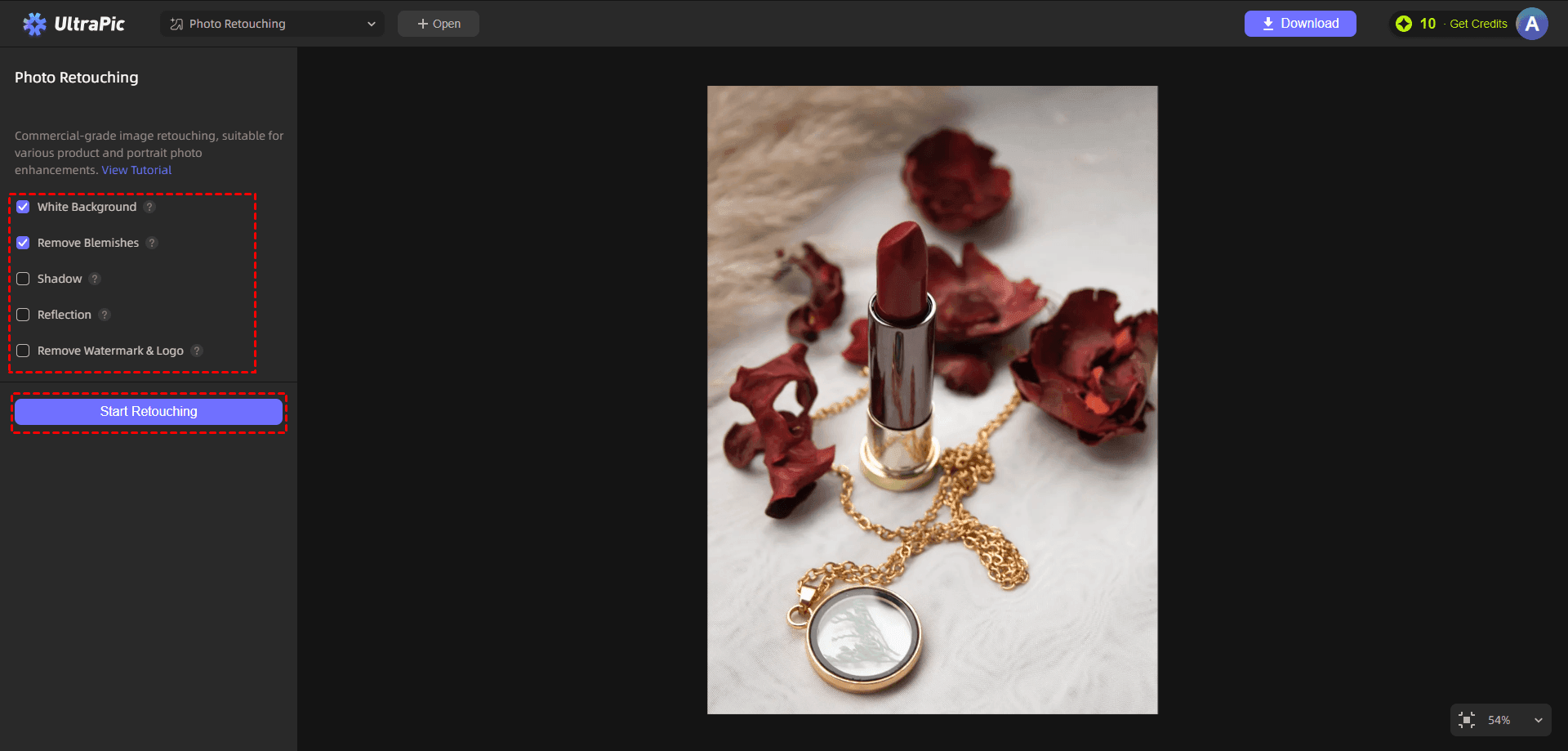
Step 1. Access the Photo Retouching tool on UltraPic, then upload the skincare product photo you want to retouch.
Step 2. Select the features: White Background, Remove Blemishes, Shadow, Reflection, and Remove Watermark & Logo as needed, then click Start Retouching.
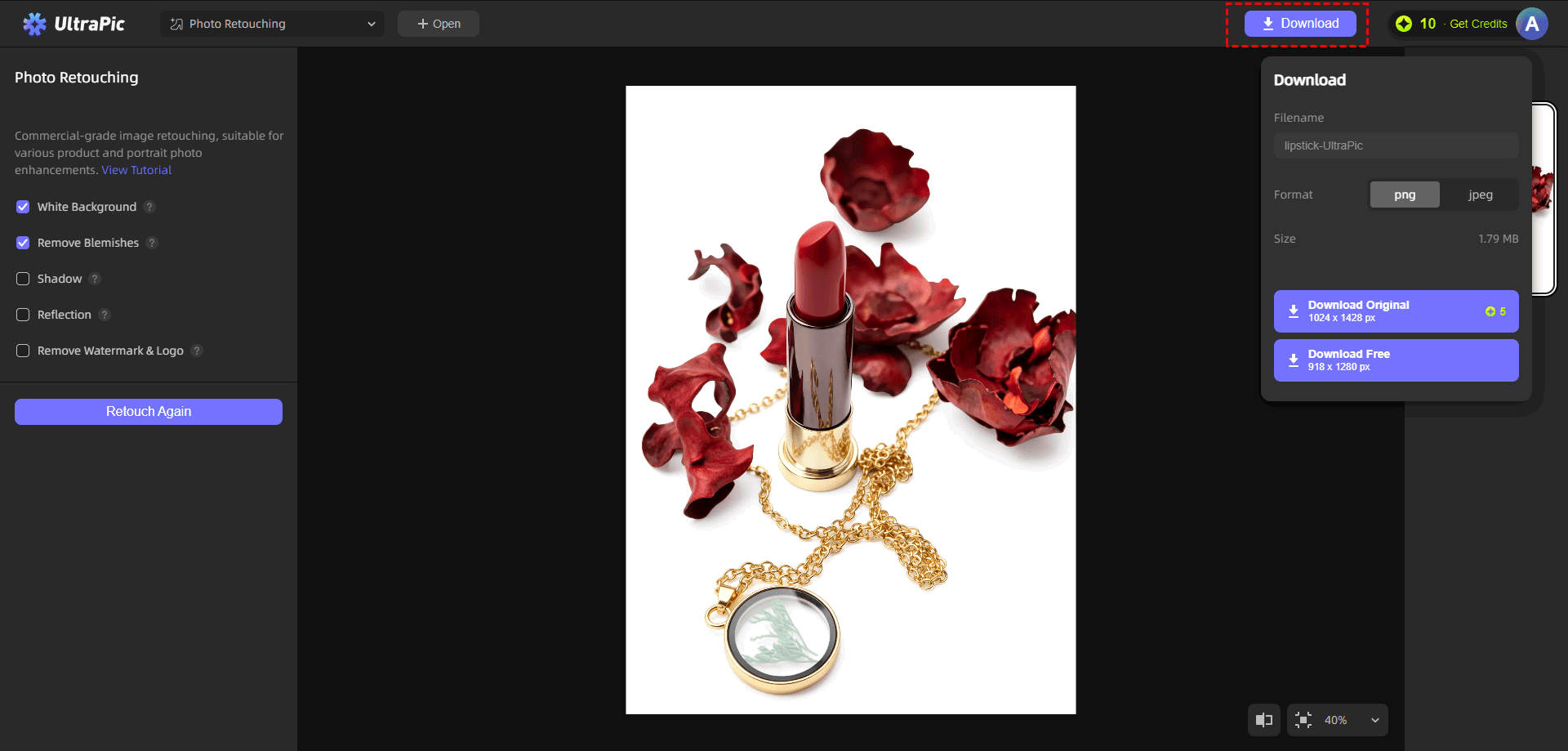
Step 3. Allow the AI engine to analyze the image and generate improvements automatically. Then, click Download to export the final image.
FAQs on Skin Care Product Photography
#1. What lighting is best for skin care product photography?
Soft, diffused lighting is generally considered the best choice for skincare photography. Natural window light often produces excellent results because it creates gentle shadows and realistic colors. Professional photographers may also use diffused studio lighting to achieve greater consistency. It is suggested to avoid harsh direct lighting whenever possible.
#2. Which background works best for skin care product photography?
The ideal background depends on the brand's visual identity. Popular choices include:
- White backgrounds
- Marble surfaces
- Neutral tones
- Soft pastel colors
- Natural textures
Minimalist backgrounds often perform best for e-commerce listings because they keep attention focused on the product.
#3. Can editing fix skin care product photography shadows?
Yes. Modern editing tools can reduce or eliminate distracting shadows. AI-powered software such as UltraPic can help improve lighting balance, remove unwanted imperfections, and create cleaner product images.
However, achieving good lighting during the original photoshoot remains the most effective approach.
In the End
By exploring skin care product photography on Pinterest, photographers and marketers can discover proven styling techniques, lighting strategies, composition ideas, and visual trends that resonate with modern audiences. Clean backgrounds, soft lighting, texture-focused imagery, lifestyle scenes, and consistent branding all contribute to stronger visual communication.
At the same time, post-production is equally important. Tools such as UltraPic simplify image enhancement through AI-powered features like background removal & replacement, image upscaling, and so forth. These capabilities help improve ordinary product photos into professional marketing visuals and quickly.

