

5 Shopify Background Removers to Remove/Replace Backgrounds Easily
Looking for the best Shopify background remover tool? Discover free and online AI background remover to remove or replace your photo background with one click.

By Jonna Updated on May 19, 2026


Why Need Shopify Background Removal Tool?
In e-commerce, customers can't physically touch or try out your products; images play a crucial role. Cluttered or inconsistent backgrounds not only distract customers from the product itself but also make your store appear unprofessional - even if your products are of excellent quality. With a reliable Shopify background remover, you can effectively solve many of the common challenges faced by Shopify sellers:
- Product photos taken at home often include distracting backgrounds
- Inconsistent lighting and scenery reduce brand credibility
- Manual photo editing takes too much time and skill
- Hiring professionals for every product shoot is expensive
- Marketplaces favor clean, neutral product images
A dedicated Shopify background removal tool allows you to quickly remove or change backgrounds with white, transparent, or branded designs. This creates a uniform look across collections and helps products pop on both desktop and mobile screens.
Top 5 Shopify Background Remover Tools
With dozens of tools available, choosing the right Shopify AI background remover can feel overwhelming. Below are 5 popular bg removers for Shopify, inluding 4K free background remover. And each with unique strengths depending on your workflowand skill level.
Shopify Magic - Shopify Native Background Removal Tool
Shopify Magic is an native Shopify AI background remover designed specifically for merchants. It integrates directly into the Shopify admin, making it a seamless option for store owners who want simplicity. Its main features are one-click background removal, no external file uploads required, optimized for Shopify product pages, etc.

Pros
✅ Extremely convenient for Shopify users
✅ No extra tools or accounts needed
✅ Consistent output aligned with Shopify standards
Cons
✖ Limited advanced editing options
✖ Less control over background replacement styles
✖ Not as flexible as dedicated photo-editing tools
Suitable Users
Beginners setting up their first Shopify store; Sellers who want fast, no-friction editing; Merchants who prefer built-in tools over external platforms.
Remove.bg - Online Background Removing Tool
Remove.bg is one of the most well-known Shopify background remover on the web. Offering a Shopify Background Remover plugin, it uses AI to detect subjects and remove backgrounds in seconds. It features high-accuracy AI edge detection and API integration for bulk processing. And it supports product photos, portraits, and objects in PNG and JPG formats.

Pros
✅ Extremely fast processing
✅ Minimal learning curve
✅ Excellent edge detection
Cons
✖ Free version has resolution limits
✖ Subscription needed for high-quality exports
✖ Can struggle with similar-colored backgrounds
Suitable Users
Sellers who want quick edits; Shopify sellers processing large image volumes; Teams integrating background removal into workflows
UltraPic - Online Shopify AI Background Remover
UltraPic is an AI-powered Shopify background remover online specially designed for e-Commerce users. It focuses heavily on product photography and Shopify compatibility. Apart from removing backgrounds, it allows users to replace them with clean whites, lifestyle scenes, or branded backdrops, perfect for Shopify stores. It is famous for smart object detection for complex products and allows batch image processing.

Create Studio-Quality Product Photos with AI
Make product images clean, professional and conversion-ready.
- Remove messy backgrounds in one click effortlessly
- Generate eye-catching custom backdrops for photos
- Boost clicks and sales with better product images
- Retouch details, no design or editing skills needed


Pros
✅ Tailored for various ecommerce use cases
✅ Batch photo processing saves time for plenties of product photos
✅ Suitable for fashion, accessories, and electronics
✅ Simple to use & beginner-friendly interface
Cons
✖ Fewer integrations compared to larger platforms
✖ Smaller ecosystem than major competitors
✖ No text can be added
Suitable Users
Shopify sellers focused on branding; Merchants who want lifestyle backgrounds; Sellers who want more control than basic tools; Brands focusing on visual consistency
Photoroom - AI Background Removal App
Photoroom is a popular AI-powered photo editor available on both mobile and desktop platforms. Its main functions are background removal and replacement, pre-designed templates for product images, text, and graphic overlays, batch editing, branding and shadow effects, and so on. It combines background removal with creative design features, and is widely used by small business owners and social sellers for quick, stylish product images.

Pros
✅ Excellent for mobile-first workflows
✅ Creative background templates
✅ Easy to use for non-designers
✅ Great for marketing visuals
Cons
✖ Free version includes watermarks
✖ Not ideal for bulk processing
✖ Advanced exports require a subscription
Suitable Users
Small Shopify sellers and solopreneurs; Social media-focused brands; Users who want quick edits from their phone.
Clipping Magic - AI Background Removal with Smart Editor
Clipping Magic combines AI automation with manual refinement tools. It's designed for users who want precision rather than one-click results. It comes with smart edge refinement tools, manual correction brushes, color correction options, and high-resolution output.
Pros
✅ High accuracy for complex products
✅ Manual control when AI misses details
✅ Precise edge editing
Cons
✖ Steeper learning curve
✖ Slower than one-click tools
✖ Requires subscription for exports
Suitable Users
Advanced Shopify sellers; brands with complex products; Jewelry, fashion, or transparent items; users who value precision over speed.
How to Change Background in Shopify using UltraPic
Here is a step-by-step guide on how to let Shopify remove background for images easily using the online Shopify background removal tool - UltraPic.
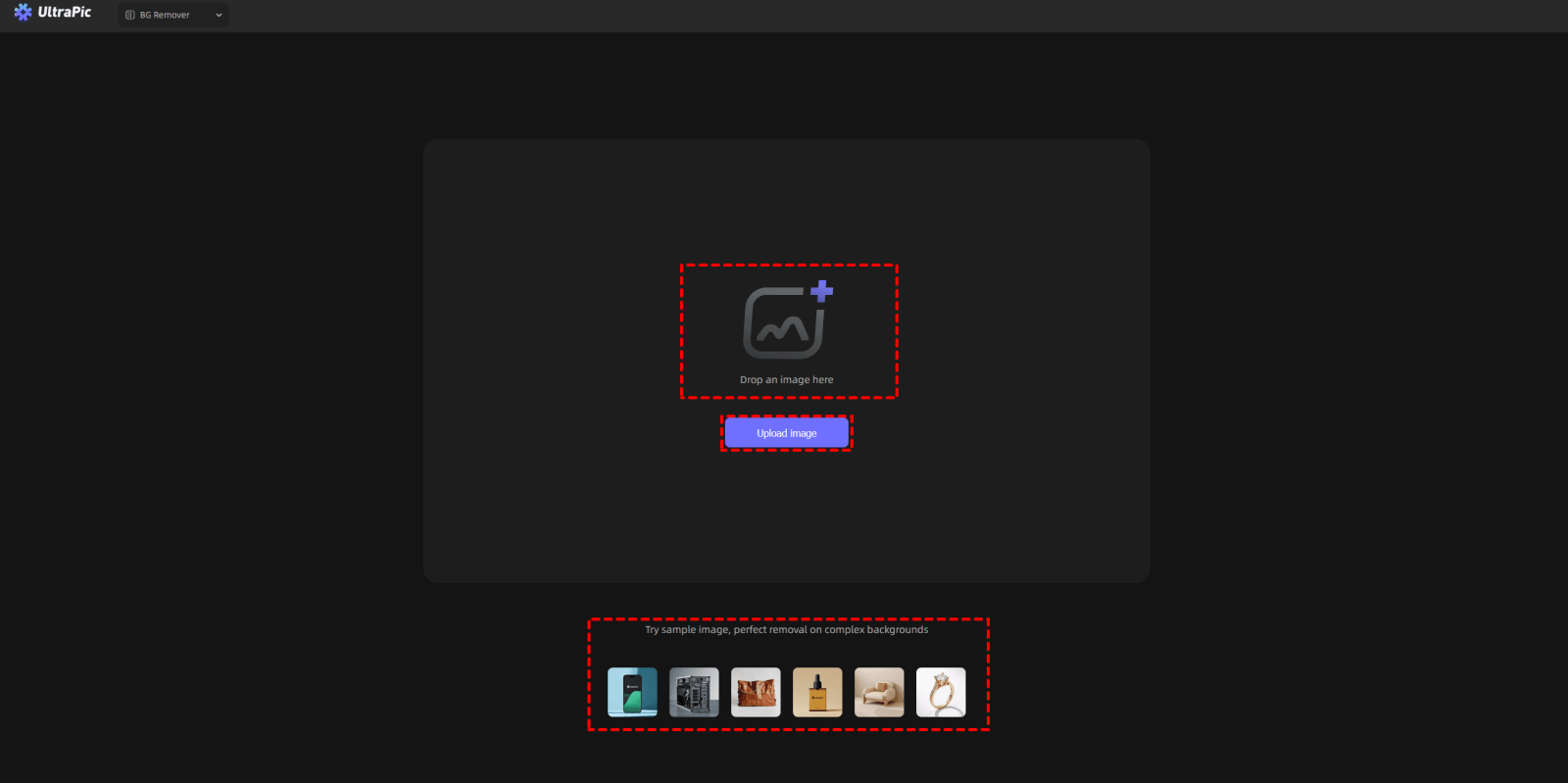
Step 1. Go to UltraPic Editor and drag in your image.
👉To remove backgrounds for multiple photo with one click, go to the Batch Editor tool directly or select Batch Editor from its menu tools.
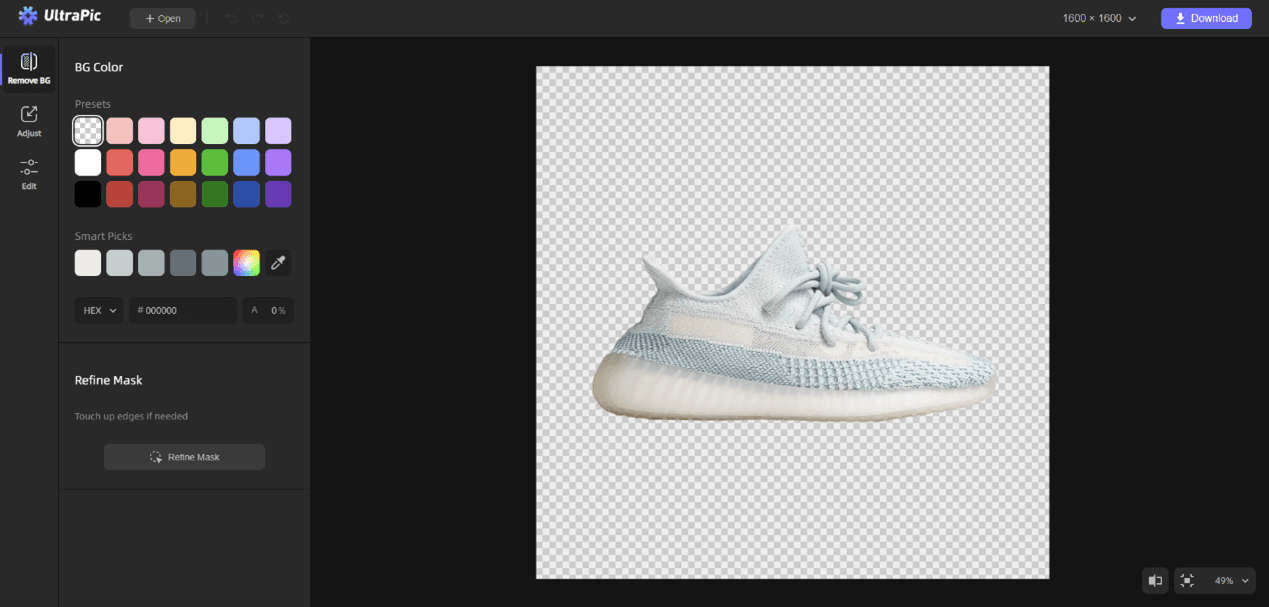
Step 2. This AI background remover tool will automatically remove the background in seconds during the upload, and laeving only a transparent background for the image.
Step 3. To change background for Shopify product images, you can click Generate BG on the left - there are 3 options ways available:
- Select a template and change the background with 1-click.
- Upload a background reference photo to generate a similar background
- Using a text description prompt to create a fully custom background
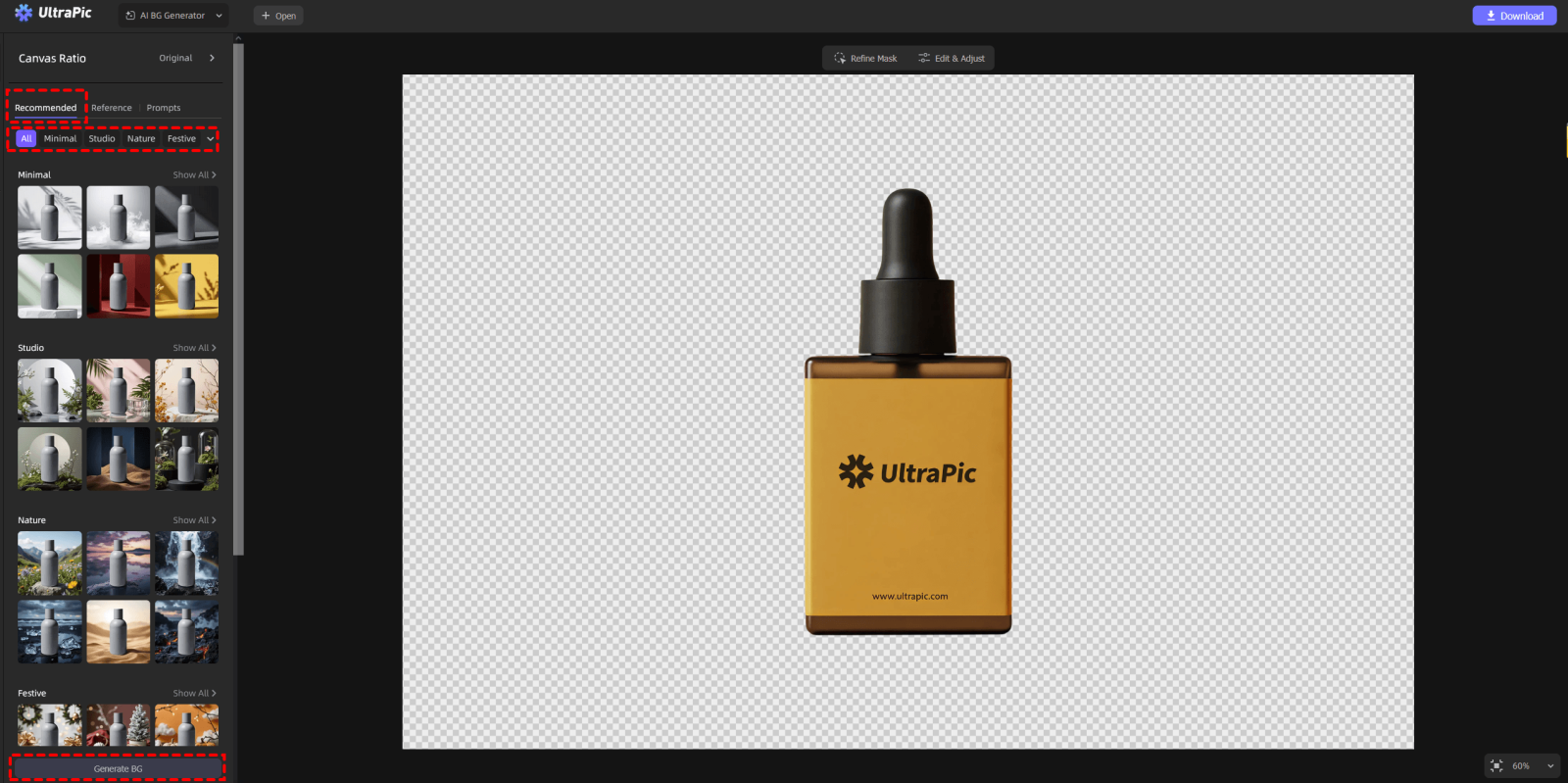
Step 4. Now, you can click Download to export the changed photos.
What Are Shopify Image Requirements?
Even the best background removal tool won't help if your images don't meet Shopify's technical standards. Understanding these requirements ensures your product photos look sharp and load quickly. Shopify generally recommends:
- Image resolution of at least 2048 x 2048 pixels
- Square images for consistency
- File formats such as JPG, PNG, or WebP
- Clean backgrounds that highlight the product
- Optimized file sizes for faster loading
Product images should be large enough to zoom without losing quality, but not so large that they slow down page performance. Clean backgrounds help Shopify's themes display products consistently across desktop and mobile devices. Using Shopify background removers like UltraPic makes it easier to meet these requirements while maintaining a cohesive visual style throughout your store.
Conclusion
High-quality product images are essential in e-commerce. With the help of modern Shopify background removers, removing or replacing backgrounds is no longer a complex task. If Shopify's built-in Magic tool is limited for you, you may try the online AI background remover, UltraPic.
Except for background removal, it also makes it simple to retouch photos to remove unwanted objects from product images. You can try it yourself - no installation needed.

