

Open Source Background Remover: Best Free Tool vs. Online AI Tool
The open source background remover ecosystem provides powerful, cost-free solutions for users who value control and transparency.

By Jonna Updated on August 5, 2026


Open source background removers have become a must-have tool for designers, photographers, and content creators. Whether it's making product images, creative designs or personal projects, removing the background is a basic and critical task.
Open source software provides you with powerful background removal solutions. It allows you to:
- Access and modify source code
- Run tools offline for better privacy
- Avoid subscription fees
- Integrate background removal into custom workflows
A free open source background remover not only lowers the technical threshold and economic cost, but also promotes the sharing and innovation of technology.
For the specific task of background removal, open source software provides a variety of solutions from simple color keying to complex AI recognition, meeting the needs of users with different technical levels.

GIMP with Plugins: A Classic Free Open Source Background Remover
GIMP (GNU Image Manipulation Program) is one of the most famous and comprehensive free and open source image editing software, often referred to as the open source version of Photoshop.
As a powerful open source background remover, GIMP provides a variety of tools and plugins to achieve background removal.
While GIMP doesn't have a one-click AI removal feature, you can achieve precise background removal with its professional tools and plugins:
How to Remove Backgrounds in GIMP (Step-by-Step)
1. Launch GIMP and open your image file.
2. Right-click the image layer → Add Alpha Channel (required for making background transparent in GIMP).
3. Use tools such as:
🔰Foreground Select Tool: Roughly mark foreground and background regions; The algorithm automatically calculates the best edge, suitable for medium complexity images.
🔰Fuzzy Select Tool: Roughly select the main body, use the Refine function in the Select menu to fine-tune the edges; It is especially effective when dealing with hair or complex edges.
🔰Paths Tool: Carefully outline the main body, convert the path to a selection, invert the selection, and delete the background; Suitable for images with clear edges, such as product photography.
4. Export as PNG or WebP to keep transparency.
✅ Pros: Free, flexible, open source
⚠️ Cons: Time-consuming, learning curve, manual effort
Free Alternative: UltraPic Online AI Background Remover
However, while open source tools are powerful, they often require more manual steps and technical understanding.
For users looking for a quick and convenient option, UltraPic is an ideal AI background remover. It offers 1-click AI background removal online via a browser. There is no need to install software, learn complex tools, or manually adjust edges. Also, it comes with plenty of image editing tools like background replacement, object removal, image enhancer, photo retouching, and so on.
You only need to upload the image, and the AI can automatically identify the subject and remove the background in a few seconds, while maintaining natural and clear edges. Even complex hair, jagged edges, or objects with false transparent backgrounds can be handled well.

Remove Backgrounds from Images in Seconds
Get clean, conversion-ready product photos instantly with AI.
- 100% automatic background removal for product pics
- Preserve every detail, keep edges sharp and clean
- Make product listings look polished to boost sales
- Save hours of manual editing using our AI tool now


How to Remove Background for Free [3 Steps]
If you want professional results without complex setup, UltraPic is worth trying alongside your open source tools.
1. Choose BG Remover, then drag and drop or select your image from your computer.
2. UltraPic will automatically detect the subject and background, then instantly remove the unwanted background — creating a clean, transparent background.

Are you busy with the new product launch? Try to remove the background in batches, and you can get hundreds of product pictures in 3 minutes, quickly seizing the traffic.
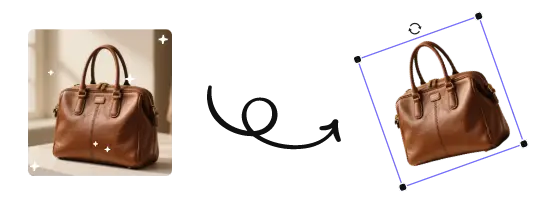
3. Click to Download your images and upload them directly to your store.
GIMP vs UltraPic: How to Choose the Best Background Remover?
| Feature | GIMP (with Plugins) | UltraPic |
| Installation | Desktop open-source software | Online AI photo tool |
| Ease of Use | Steep learning curve | Extremely simple, one-click background removal |
| Platform | Windows, macOS, Linux | Any device with a modern web browser |
| Cost | Completely free and open-source | Free/premium plans |
| Speed | Slower (manual) | Instant |
| Best For | Designers, projects requiring fine-grained control | Quick bulk processing, efficiency-first workflows |
📌Choose GIMP if: you want a completely free and open source option, need in-depth image editing beyond just background removal, don't mind a learning curve, and are working on particularly complex or professional projects that require fine control.
📌Choose UltraPic if: you prioritize efficiency and ease of use, need to quickly batch remove backgrounds of multiple images, are a beginner or non-professional user, and want to get a one-click experience of AI intelligent processing.
FAQ about Open Source Background Removers
Q1: Which is more accurate, the open source background remover or the online AI tool?
For simple images with clear edges, skilled users may get higher accuracy using GIMP. But for complex edges (such as hair and fluff), AI background removers are usually better because AI models are trained with a large amount of data and can better identify such complex patterns.
Q2: How long does it take to remove the background with GIMP?
Simple images may only take a few minutes, while complex images may take more than half an hour to refine. However, AI image editors like UltraPic usually only take 5-10 seconds if the network is stable.
Q3: Can the GIMP open source tool handle transparent objects or shadows?
GIMP can handle these complex situations thru advanced layer and mask technology, but it requires high skills.
Q4: Do these tools support batch processing?
GIMP can achieve batch processing thru Python scripts, but it requires programming knowledge. UltraPi provides an intuitive batch processing interface. You only need to upload your images in batches and click Batch Remover to remove the background.
Conclusion
From the open-source background remover GIMP, which is comprehensive in function but steep in learning curve, to the intelligent and efficient UltraPic online AI tool, each solution is designed for different needs and scenarios.
Whichever path you choose, open source is driving the advancement of background removal tools, making what was once a professional and time-consuming task more accessible and efficient. You can also choose to use UltraPic for quick daily tasks and batch jobs, and use GIMP for in-depth image creation when further editing is required.
Visit UltraPic now to experience the convenience and efficiency of one-click intelligent background removal.

